Backlog Bankruptcy: Why Your Jira Backlog Keeps Growing and What to Do About It
Enterprise Jira backlogs grow every month until nobody trusts them: thousands of zombie tickets, year-old "High" priorities and grooming sessions that change nothing. Learn what engineering leaders on Reddit say about backlog bankruptcy, why the problem stays invisible, and how Keypup MCP uses issue age, workflow history, priority, resolution and linked pull requests to measure it and plan a reset.
TL;DR: In many enterprise organizations, the Jira backlog grows every month even though teams close thousands of issues. Most open issues are more than a year old, most have never been started, many "High" priorities have waited for over a year, and when old issues finally close, it's usually as Won't Do or Duplicate — not with merged code. This is backlog bankruptcy: a backlog too big to plan from and too old to trust. The Keypup MCP Server reads each Jira issue's creation, update and closing dates, its workflow status history, priority, resolution, sprints and linked pull requests, so your AI assistant can size the zombie backlog, show whether inflow outpaces outflow, find where old work piles up, show when issues stop getting done, and give each project a data-backed reset plan.
Every enterprise engineering organization has the same slide somewhere in a quarterly review: the open backlog, a number in the tens of thousands, followed by a plan to "groom it down". A quarter later the number is higher. Grooming sessions get longer, product managers lose faith in the list, and engineers stop reading it. Nobody declares it out loud, but the backlog has gone bankrupt.
The Friction: A List Nobody Trusts
Backlog bankruptcy is the point where a backlog contains so much old, stale and duplicated work that it can no longer be used to plan, prioritize or forecast. It doesn't happen through one bad decision. It happens because creating an issue is free and closing one without doing it feels like a loss.
The problem stays invisible for structural reasons:
Inflow is never compared with outflow. Teams report what they closed, not what they created. A team closing 500 issues a month looks productive even if it opens 600.
Age isn't visible in the tools people use. Jira boards show the next few sprints. The 9,000 issues behind them are only seen as a count.
Priorities never expire. An issue marked High three years ago is still High today, competing with this week's genuine urgencies.
Clean-ups leave no trace. When someone bulk-closes 2,000 tickets, the backlog shrinks for a month and the habits that created them stay the same.
The result: leaders plan from a list where most entries will never be done, and teams spend refinement time re-reading tickets nobody will build.
Why This Matters: The Real Cost of a Zombie Backlog
The Planning Problem
When the backlog is mostly noise, it can't answer the questions leadership asks: how much work is waiting, what's most important, when will it be done. Product managers start keeping their own lists in spreadsheets and slides, and the official backlog becomes a graveyard that still gets counted as demand.
The Prioritization Problem
If thousands of issues are marked High, the label means nothing. Real urgencies get escalated through side channels — direct messages, meetings, executive requests — which bypass planning entirely and add to the interrupt load on teams.
The Trust Problem
Customers and internal stakeholders are told their request "is in the backlog". A year later it still is. Every zombie ticket is a promise that was never declined, and the cumulative effect is that nobody believes the backlog is where work gets decided.
The Enterprise Discussion: What Engineers Are Actually Saying
Backlog size and ticket hygiene come up again and again wherever engineering managers, product leaders and staff engineers at large organizations compare notes. The quotes below are representative of recurring threads on r/ExperiencedDevs, r/agile, r/ProductManagement and r/jira.
Engineering Manager, Insurance Group (r/ExperiencedDevs)
"Our backlog has 14,000 tickets. I'd bet my bonus that 10,000 of them will never be done. Every quarter we spend two full days 'grooming' it and the number still goes up."
"Half the tickets marked High priority were created by people who left the company. Nobody wants to close them because closing feels like saying no to someone, so they just sit there competing with real work."
Staff Engineer, Telecom Platform (r/agile)
"We declared backlog bankruptcy last year and closed everything older than 18 months. Six months later we were back to the same size. Nobody looked at why the backlog grew in the first place."
The pattern holds: everyone knows the backlog is too big, but nobody can show how old it really is, whether it's still growing, which priorities have expired or which projects drive the growth — because that evidence is spread across the dates, status history, resolutions and linked pull requests of tens of thousands of issues.
How Keypup MCP Measures Backlog Bankruptcy
The Keypup Model Context Protocol (MCP) Server gives your AI assistant structured access to the issues and pull requests Keypup imports from Jira, GitHub, GitLab and Bitbucket. For every Jira issue, that includes its creation, last update and closing dates, its workflow timeline — each status it entered, with start and end timestamps — its priority, resolution and other Jira fields, its current and past sprints, and the pull requests linked to it, with their state. That's everything needed to see how old the backlog is, how it got that way and what to do about it.
1. Sizing the Zombie Backlog
The first question is how much of the backlog is actually alive.
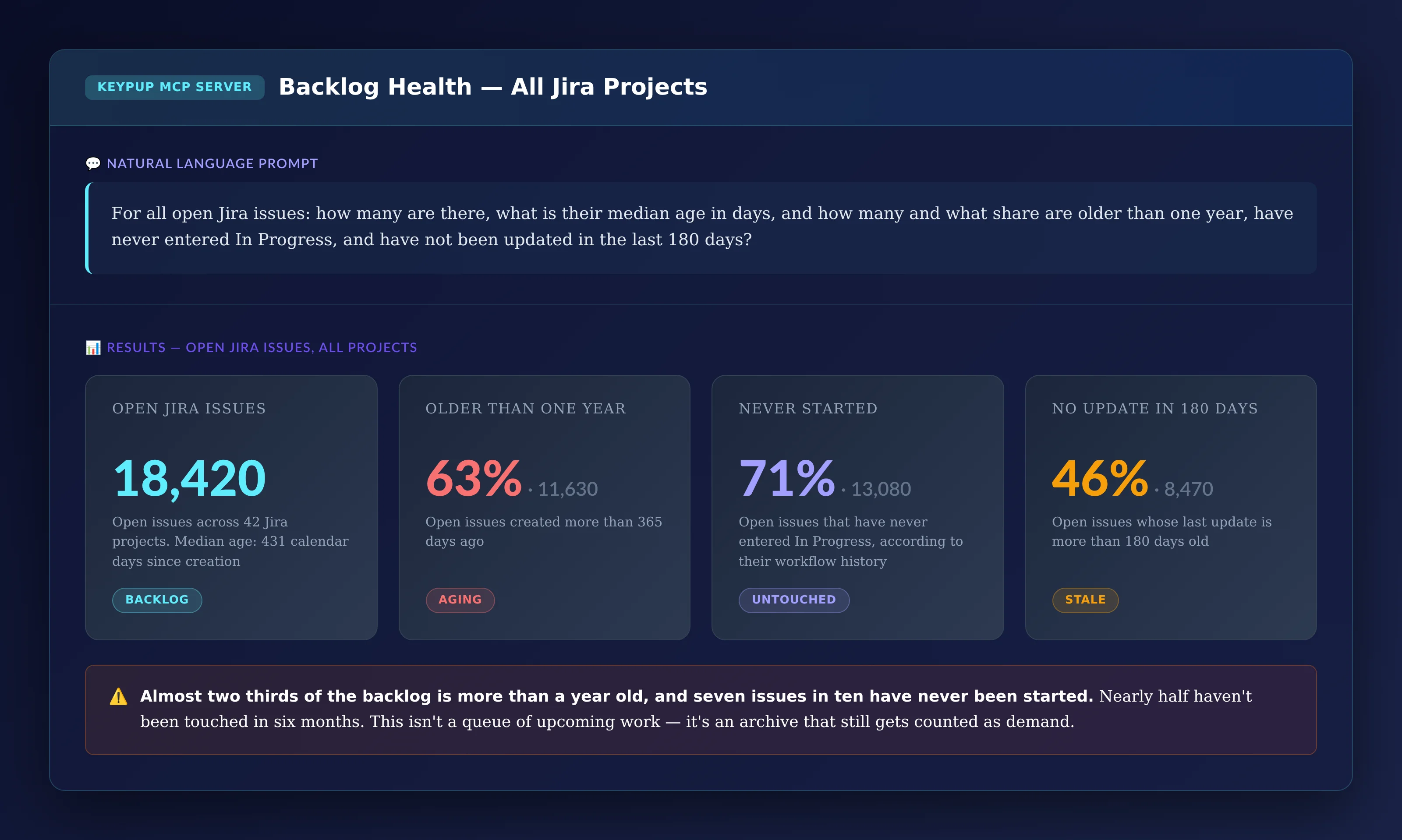
MCP Prompt:
For all open Jira issues: how many are there, what is their
median age in days, and how many and what share are older
than one year, have never entered In Progress, and have not
been updated in the last 180 days?
Output: Backlog Health — All Jira Projects
Key Insight: Almost two thirds of the backlog is more than a year old, and seven issues in ten have never been started. Nearly half haven't been updated in six months. This isn't a queue of upcoming work — it's an archive that still gets counted as demand.
2. Showing Why It Keeps Growing
A big backlog is a symptom. The cause is a flow imbalance: more work comes in than goes out.
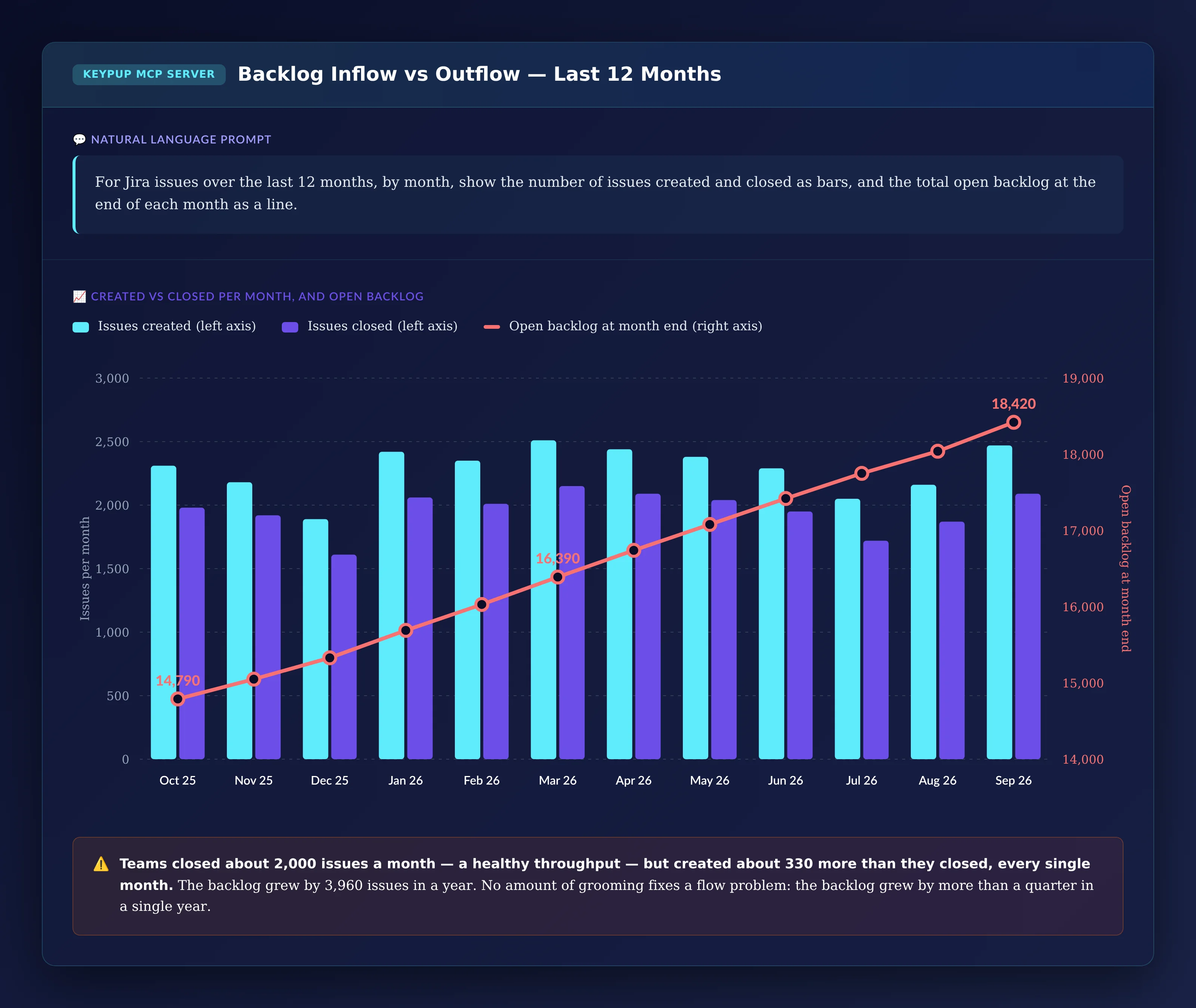
MCP Prompt:
For Jira issues over the last 12 months, by month, show the
number of issues created and closed as bars, and the total
open backlog at the end of each month as a line.
Output: Backlog Inflow vs Outflow — Last 12 Months
Key Insight: Teams closed about 2,000 issues a month — a healthy throughput — but created about 330 more than they closed, every single month. The backlog grew by 3,960 issues in a year, more than a quarter of its starting size. No amount of grooming fixes a flow problem.
3. Finding Expired Priorities
Old work isn't a problem in itself if it's clearly labeled as low priority. The problem is old work that still claims to be urgent.
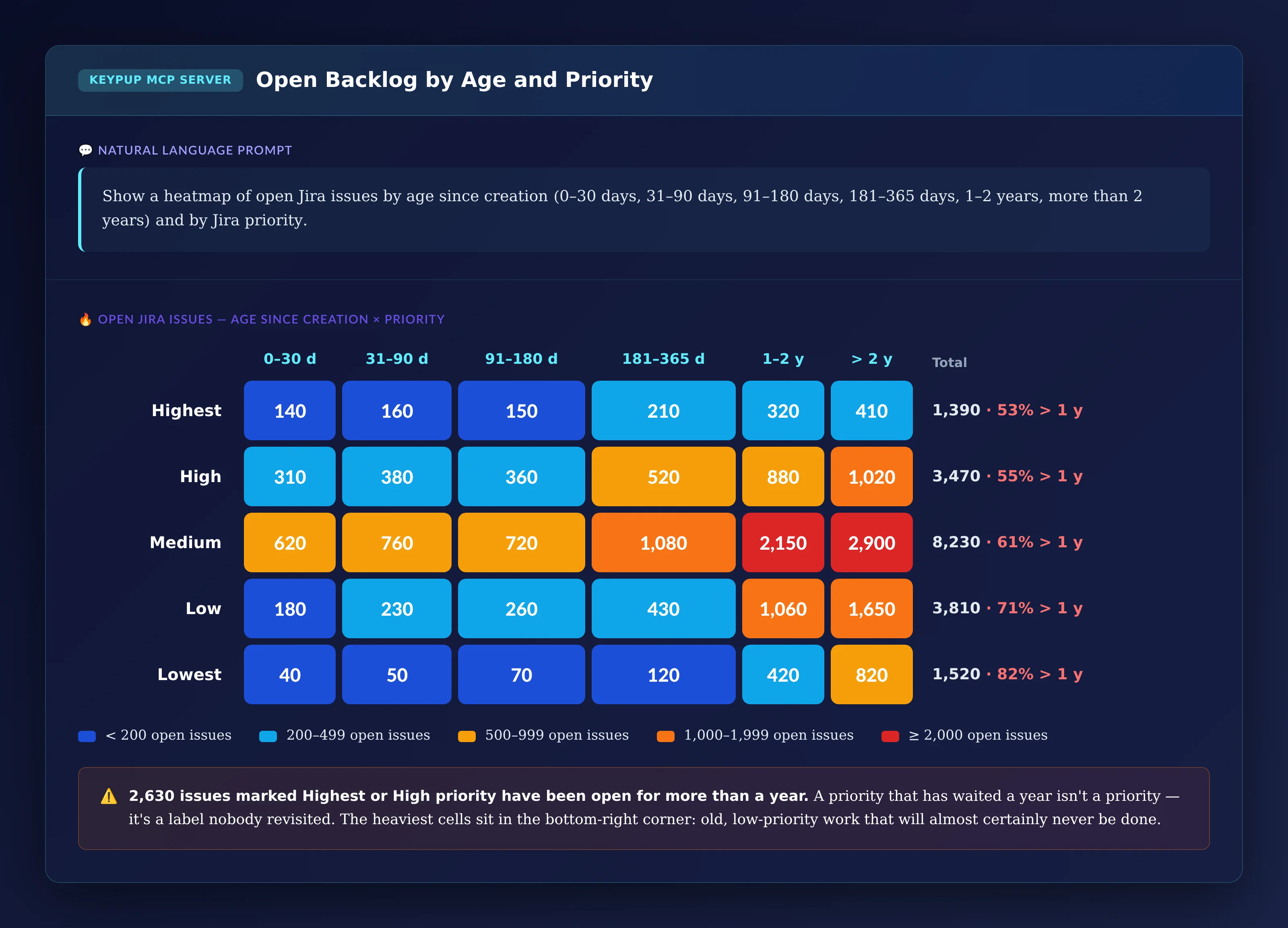
MCP Prompt:
Show a heatmap of open Jira issues by age since creation
(0–30 days, 31–90 days, 91–180 days, 181–365 days, 1–2 years,
more than 2 years) and by Jira priority.
Output: Open Backlog by Age and Priority
Key Insight: 2,630 issues marked Highest or High have been open for more than a year. A priority that has waited a year isn't a priority — it's a label nobody revisited. The heaviest cells sit in the bottom-right corner: old, lower-priority work that will almost certainly never be done.
4. Seeing When Issues Stop Getting Done
To set a backlog policy, leaders need to know at what age an issue's chances of being done fall off.
MCP Prompt:
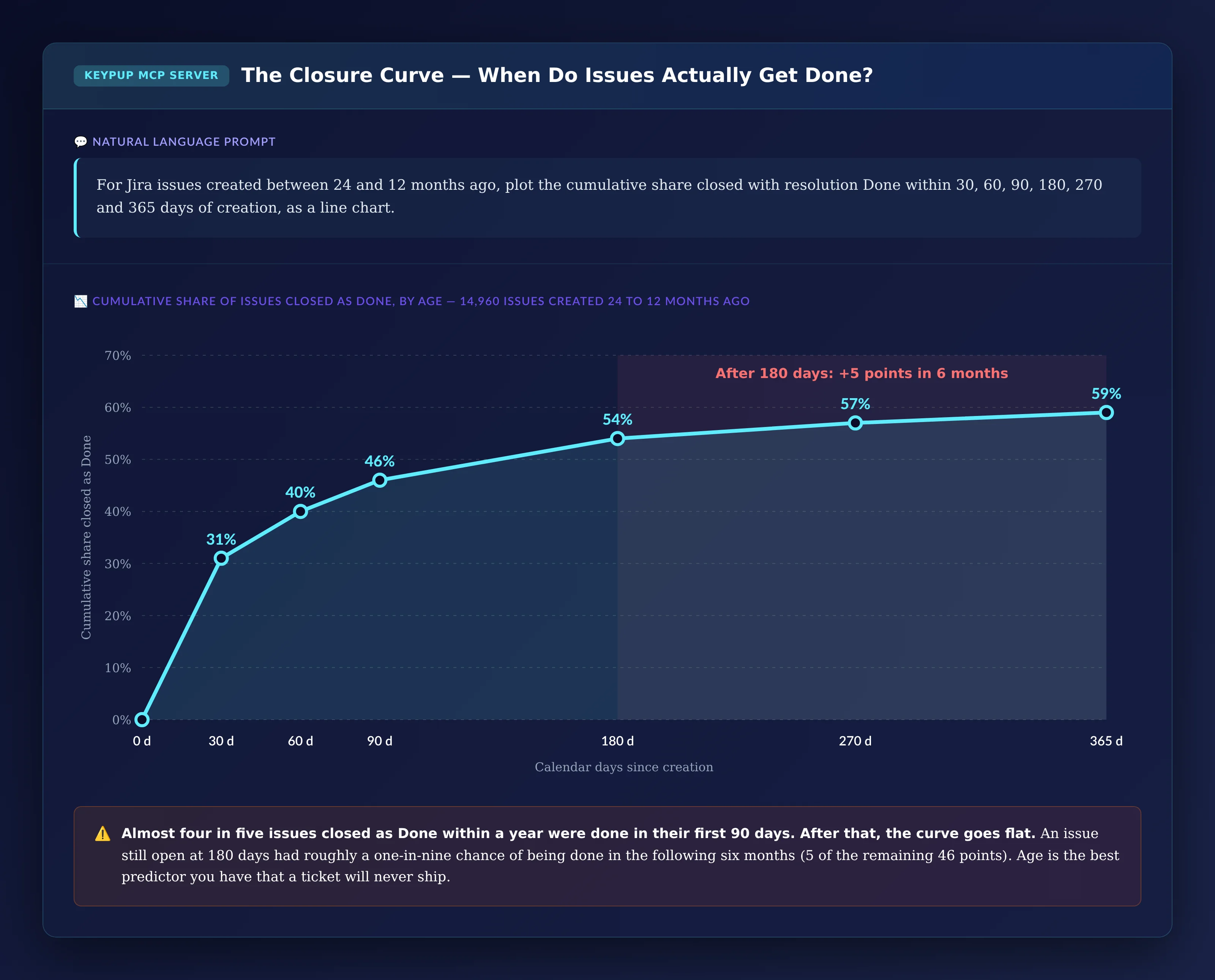
For Jira issues created between 24 and 12 months ago, plot
the cumulative share closed with resolution Done within 30,
60, 90, 180, 270 and 365 days of creation, as a line chart.
Output: The Closure Curve
Key Insight: Almost four in five issues closed as Done within a year were done in their first 90 days. After that, the curve goes flat: an issue still open at 180 days had roughly a one-in-nine chance of being done in the following six months. Age is the best predictor you have that a ticket will never ship.
5. Seeing How Old Issues Actually Leave
When old issues do close, how they close tells you whether the backlog held real work.
MCP Prompt:
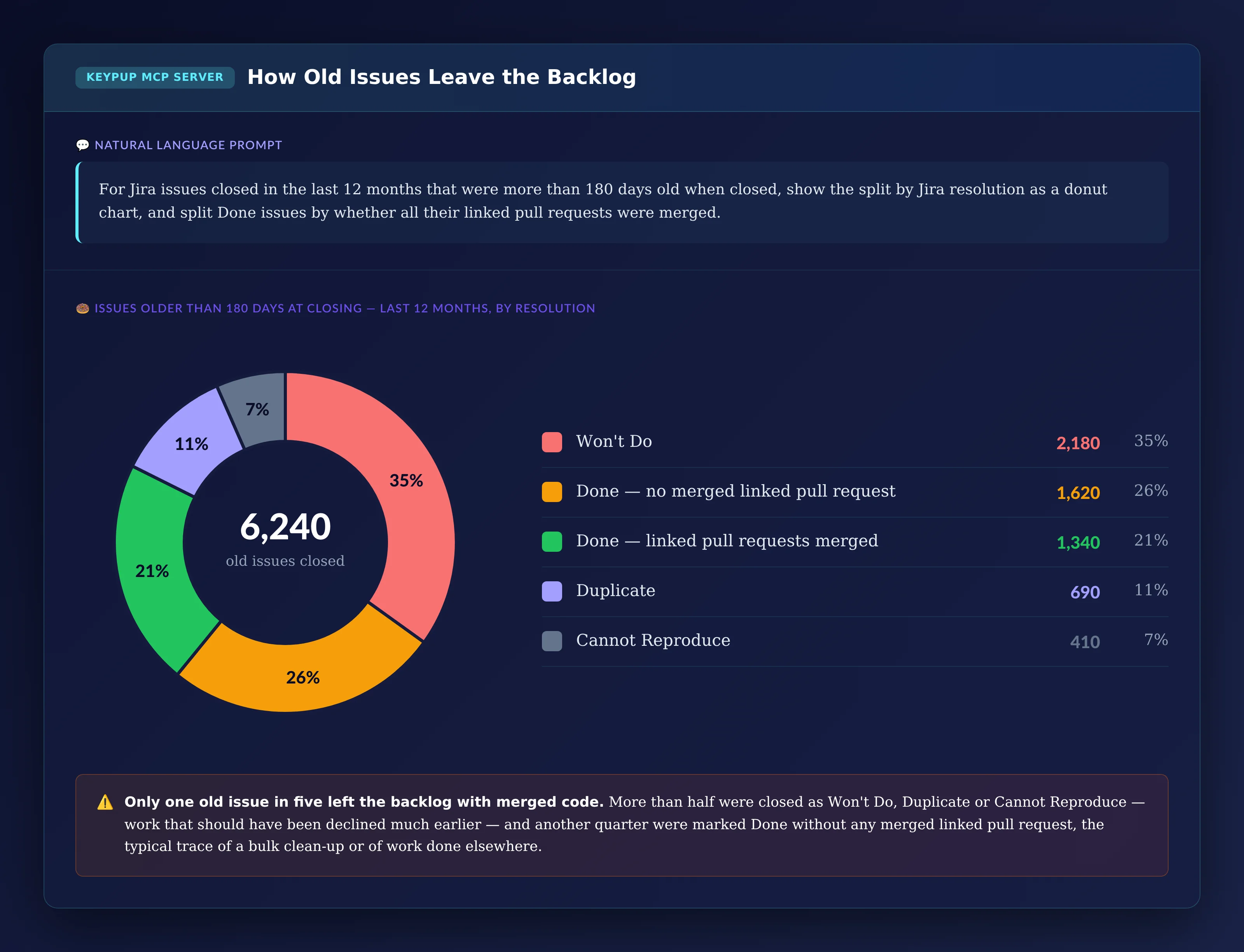
For Jira issues closed in the last 12 months that were more
than 180 days old when closed, show the split by Jira
resolution as a donut chart, and split Done issues by whether
all their linked pull requests were merged.
Output: How Old Issues Leave the Backlog
Key Insight: Only one old issue in five left the backlog with merged code. More than half were closed as Won't Do, Duplicate or Cannot Reproduce — work that could have been declined much earlier — and another quarter were marked Done without any merged linked pull request, the typical trace of a bulk clean-up, of work that didn't need code, or of pull requests that don't reference the issue key.
6. Building a Reset Plan per Project
A backlog reset works best project by project, starting where the problem is biggest.
MCP Prompt:
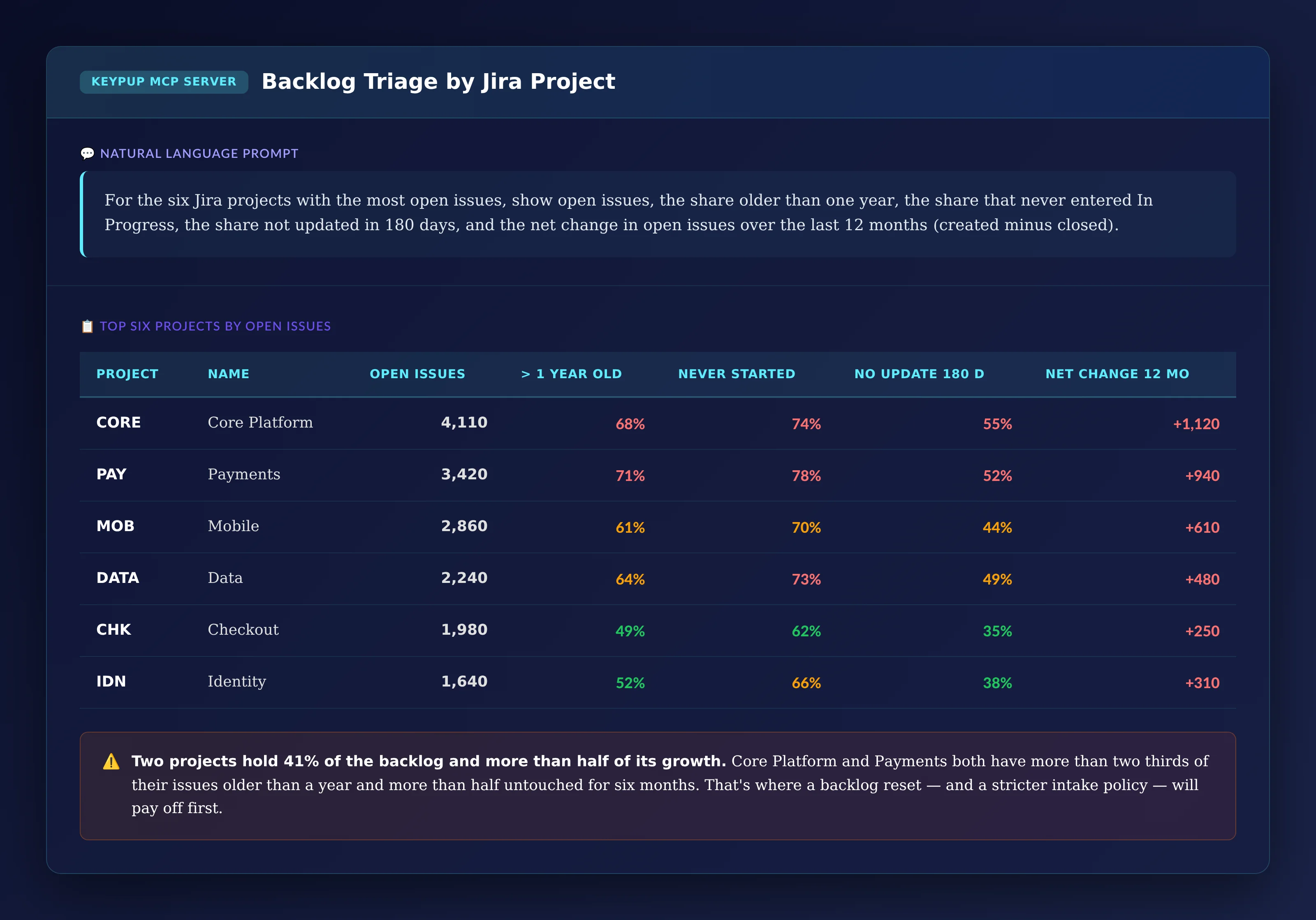
For the six Jira projects with the most open issues, show
open issues, the share older than one year, the share that
never entered In Progress, the share not updated in 180 days,
and the net change in open issues over the last 12 months
(created minus closed).
Output: Backlog Triage by Jira Project
Project
Name
Open Issues
> 1 Year Old
Never Started
No Update 180 d
Net Change 12 mo
CORE
Core Platform
4,110
68%
74%
55%
+1,120
PAY
Payments
3,420
71%
78%
52%
+940
MOB
Mobile
2,860
61%
70%
44%
+610
DATA
Data
2,240
64%
73%
49%
+480
CHK
Checkout
1,980
49%
62%
35%
+250
IDN
Identity
1,640
52%
66%
38%
+310
Key Insight: Two projects hold 41% of the backlog and more than half of its growth. Core Platform and Payments both have more than two thirds of their issues older than a year and more than half untouched for six months. That's where a backlog reset — and a stricter intake policy — will pay off first.
The Technical Implementation: What Keypup MCP Actually Reads
Every number above comes from data Keypup already imports from Jira and your Git platform. It helps to be precise about what that data is — and what it isn't.
Age and Staleness Come From Issue Dates
Keypup imports each issue's creation date, last update date and closing date. Age is the time from creation to now (or to closing). "Not updated" uses the issue's last update date, which changes whenever the issue is edited — for example a field change or a reassignment — so it measures whether anyone touched the issue, not whether anyone worked on it.
"Never Started" Comes From the Workflow Timeline
For every Jira issue, Keypup stores the workflow statuses it went through, with start and end timestamps. "Never started" means the issue has never entered your development status. If your teams use other names — "In Development", "Doing", "Building" — use those exact names in the prompt.
Priority and Resolution Come From Jira Fields
Keypup imports Jira's Priority and Resolution fields with every issue, along with other standard and custom fields such as Components, Labels or Team. The priority used is the current value — Keypup doesn't keep a history of priority changes. The resolution split is only as reliable as your workflows: if teams close issues without setting a resolution, or always use Done, the donut can't separate declined work from finished work.
Inflow, Outflow and Backlog Size Are Counted From Issues
Monthly created and closed counts are counted directly from creation and closing dates, and the open backlog at the end of each month is derived from them.
Linked Pull Requests Show Whether Code Shipped
For each issue, Keypup tracks the pull requests linked to it and whether they were merged. This depends on your pull requests referencing the Jira issue key; issues whose pull requests don't reference the key look like they were closed without code, even if code was written for them.
Real-World Impact: Enterprise Case Studies
Case Study 1: Global Insurance Group
Before Keypup MCP:
More than 20,000 open issues across 30 Jira projects
Two days of backlog grooming per team every quarter, with no visible effect
Two previous bulk clean-ups, each followed by the backlog returning to its original size within a year
After Keypup MCP:
The inflow vs outflow chart showed the backlog growing by several hundred issues every month, which moved the conversation from grooming to intake
The closure curve set the policy: issues untouched after 180 days are reviewed once and then closed as Won't Do, with a note to the requester
Each project got a quarterly backlog review based on its own triage row instead of a global clean-up
"We'd cleaned the backlog twice and it grew back both times. The inflow chart showed us why: we were creating more than we could ever finish. Once we fixed intake, the backlog shrank on its own for the first time in five years."
— CTO, Global Insurance Group
Case Study 2: Enterprise Fintech Platform
Before Keypup MCP:
Product managers maintained their own roadmaps in slides because the backlog wasn't trusted
Thousands of High priority issues, many created by people who had left
Urgent requests escalated through executives instead of the backlog
After Keypup MCP:
The age and priority heatmap identified every High priority issue older than a year, which were reviewed with their product owners in a single session
Priority was reset for issues that had waited more than a year, and High became a label that meant something again
The donut chart became a quarterly KPI: the share of old issues closed as Won't Do or Duplicate dropped as teams learned to decline work at intake
"For years, 'it's in the backlog' was the polite way of saying no. The data made that visible. Now we say no on day one, and the backlog is short enough that people actually read it."
— VP Product, Enterprise Fintech Platform
Implementation: Getting Started with Keypup MCP
1. Connect Jira and Your Git Platform
Connect Jira and GitHub, GitLab or Bitbucket to Keypup. Issue dates, workflow status histories, priorities, resolutions, sprints, custom fields and pull request links are imported automatically.
2. Confirm Your Status and Resolution Conventions
Check the name of your development status and how teams set resolutions when closing issues. Use those exact names in your prompts, and agree on a resolution (such as Won't Do) for declined work so it can be told apart from finished work.
3. Check Your Linking Hygiene
Confirm that pull requests reference Jira issue keys. This decides how precisely Keypup can tell issues closed with code from issues closed without it.
4. Connect the MCP Server to Your AI Assistant
Follow the MCP documentation to connect Keypup to Claude, ChatGPT, Cursor or any MCP-compatible assistant.
5. Set a Baseline, Then Fix Intake Before Cleaning
Run the health, inflow vs outflow and closure curve prompts to set a baseline. Fix the flow imbalance first — triage at intake, a clear policy for declining work, an age limit for untouched issues — and only then run a project-by-project clean-up using the triage table. Re-run the prompts every quarter to check the backlog stays healthy.
Frequently Asked Questions
What is backlog bankruptcy?
Backlog bankruptcy is when a product or engineering backlog holds so much old, stale or duplicated work that it can no longer be used to plan or prioritize. Teams often "declare bankruptcy" by bulk-closing old issues, but unless the cause — more work created than closed — is fixed, the backlog grows back.
How big should a Jira backlog be?
There's no universal number, but a useful rule is that a team's backlog shouldn't hold much more than it can deliver in two or three quarters. Compare your open issue count with your monthly closed count: if the backlog represents years of work, most of it will never be done.
Should we close old Jira tickets?
Usually, yes. Look at your own closure curve: if issues that are still open after 180 days rarely get done, closing them with a clear resolution (such as Won't Do) is more honest than keeping them open. Anything important will be raised again.
How do you measure backlog health?
Track the open issue count, the share older than a year, the share never started, the share untouched in 180 days and, most importantly, monthly created versus closed. Keypup MCP computes all of these from Jira issue dates, workflow history and resolutions.
The Bottom Line
A backlog isn't a measure of demand — it's a list of decisions nobody made. Keypup MCP shows exactly how much of it is alive and why it keeps growing:
✅ Sizing the zombie backlog — age, never-started and stale issues ✅ Showing why it grows — monthly inflow against outflow ✅ Finding expired priorities — urgent labels on year-old work ✅ Setting an age policy with the closure curve ✅ Seeing how old issues really leave — declined, cleaned up or shipped ✅ Planning a reset project by project, starting where the backlog grows fastest
Ready to Transform Your Analytics?
Join teams already using AI to make data-driven decisions faster than
ever.
Compare the 5 best value stream analytics platforms for engineering leaders — Keypup, Pluralsight Flow, LinearB, Jellyfish and Swarmia — across DORA Metrics depth, cross-platform data unification, contextual analysis, customization, AI and natural language capabilities, and setup speed. Find out which value stream management platform turns Git, Jira and CI/CD data into prescriptive, actionable insights.
Ten-line pull requests get twenty comments. Two-thousand-line pull requests get "LGTM" in four minutes. Learn what engineering leaders on Reddit say about rubber-stamp code reviews in large organizations, why the problem stays invisible, and how Keypup MCP uses pull request size, review timestamps, approvals and comments to measure it repository by repository.
Story points are supposed to make delivery predictable, yet an 8-point issue rarely takes much longer than a 3-pointer and points inflate quarter after quarter. Learn what engineering leaders on Reddit say about story points, why the estimation gap stays invisible in enterprise reporting, and how Keypup MCP compares Jira story points with workflow history, sprints and linked pull requests to measure it.