6 Best Engineering Analytics Tools for Jira and Git (2026)
Compare the 6 best engineering analytics tools for Jira and Git in 2026 — Keypup, LinearB, Jellyfish, Swarmia, Faros AI and Pluralsight Flow — across Git and Jira unification, DORA Metrics and cycle time, dashboard customization, AI and natural language, integration breadth, setup speed and security. Find out which platform turns your code and ticketing data into one reporting layer with prescriptive recommendations.
Liam Davis
•13 min read
Table of Contents
Your Git data tells one story. Your Jira board tells another. The gap between them is where engineering leaders lose visibility into what their teams deliver. If you manage a SaaS engineering organization, you already know the cost: hours spent reconciling spreadsheets, conflicting status updates, and metrics that raise more questions than they answer.
Engineering analytics tools close that gap by unifying code activity and ticketing data into a single reporting layer. Keypup stands out as a top engineering analytics platform that connects Git repos, Jira, and other tools in minutes, giving you contextual analysis and prescriptive recommendations from a single data model.
This guide compares six platforms built for that job. You will find how each one handles DORA Metrics, cycle time tracking, dashboard customization, and the integrations that matter when your stack spans multiple Git providers and project management tools.
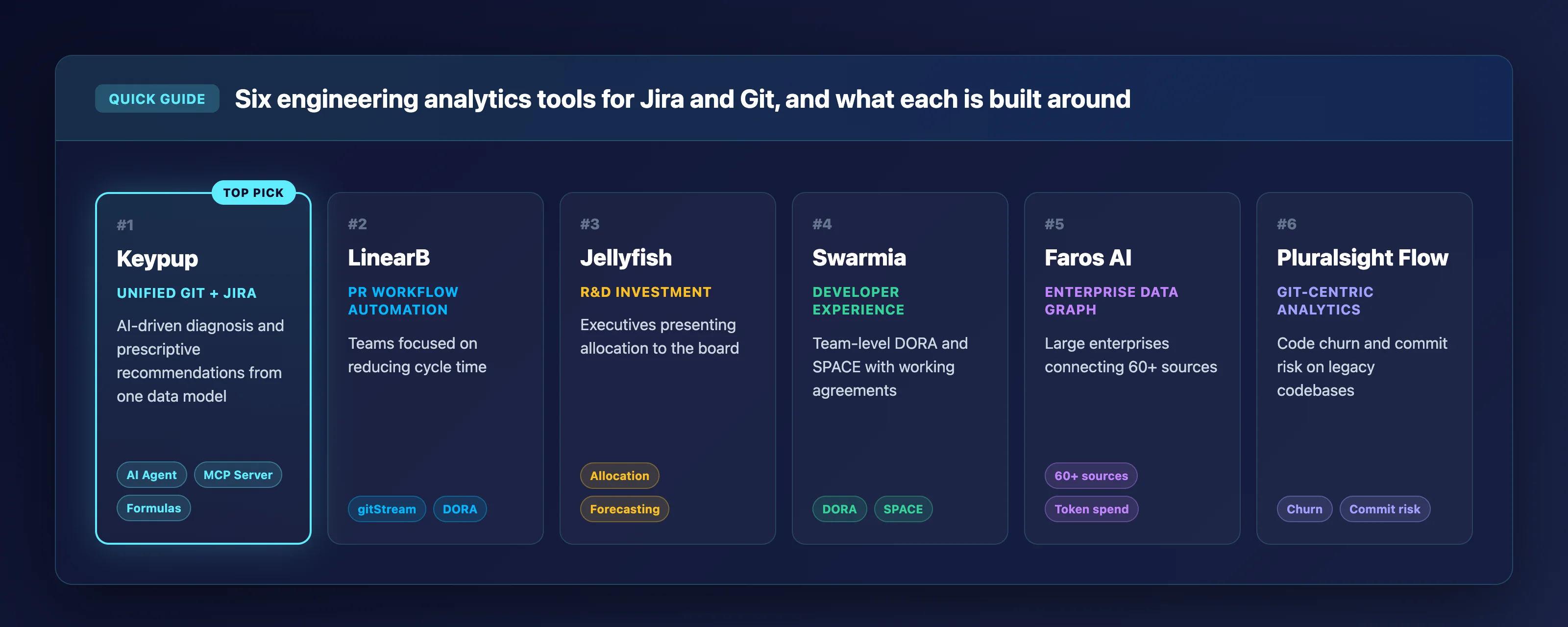
Quick guide: 6 best engineering analytics tools for Jira and Git
Keypup: The best engineering analytics platform for unified Git and Jira reporting with AI-driven diagnosis and prescriptive recommendations.
LinearB: PR workflow automation paired with DORA tracking for teams focused on reducing cycle time.
Jellyfish: Engineering investment allocation and R&D reporting built for executives presenting to the board.
Swarmia: Team-level DORA and SPACE metrics with a developer-friendly interface and working agreements.
Faros AI: A data-graph approach connecting 60+ engineering sources into a unified model for large enterprises.
Pluralsight Flow: Git-centric productivity analytics with code churn, commit risk, and investment profiling for legacy codebases.
How we chose the best engineering analytics tools for SaaS teams
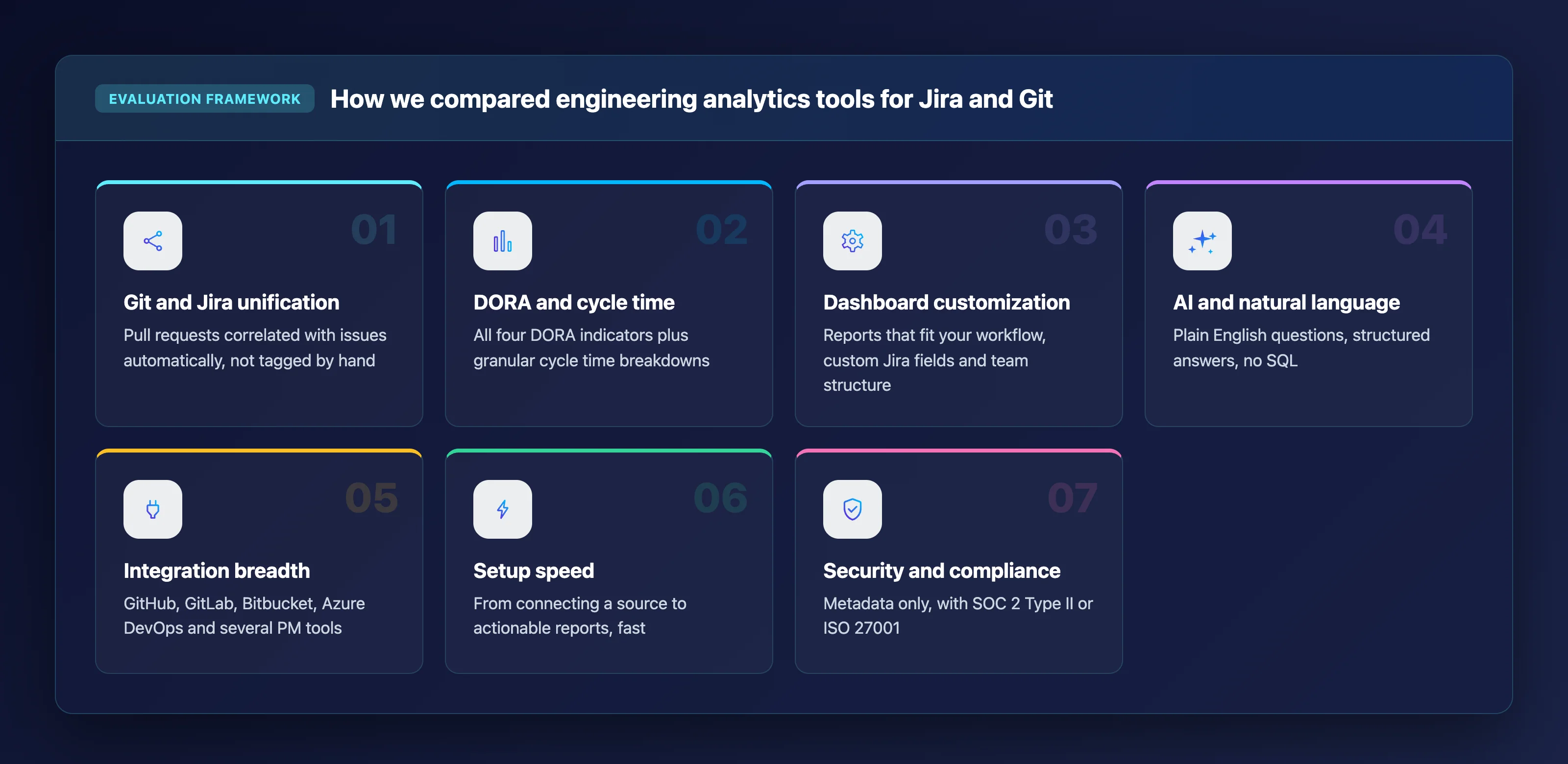
Choosing the right platform starts with understanding what matters most when Git and ticketing data need to work together. We evaluated each tool against criteria that reflect how engineering leaders at mid-market and enterprise SaaS companies make decisions.
Git and Jira unification depth: Can the tool correlate pull requests with Jira issues automatically, or does your team need to tag everything by hand? Automated linking saves you hours of reconciliation every week.
DORA Metrics and cycle time coverage: Does the platform track all four DORA indicators (Deployment Frequency, Lead Time for Changes, Change Failure Rate, MTTR) alongside granular cycle time breakdowns? These metrics tell you where your delivery pipeline stalls.
Dashboard customization: Can you build reports that match your workflow, your custom Jira fields, and your team structure? Cookie-cutter dashboards break as soon as your process diverges from the default.
AI and natural language capabilities: Can you ask questions in plain English and get structured answers, or are you still writing SQL and building charts manually?
Integration breadth: Does the platform connect to GitHub, GitLab, Bitbucket, Azure DevOps, and multiple project management tools without requiring a months-long ETL project?
Setup speed and time to value: How quickly can your team go from connecting a data source to viewing actionable reports? Platforms that require extensive onboarding delay the insight you need now.
Security and compliance posture: Does the platform handle metadata only (no source code access), and does it hold certifications like SOC 2 Type II or ISO 27001?
The 6 best engineering analytics tools for Jira and Git
1. Keypup: Best overall engineering analytics platform for Jira and Git
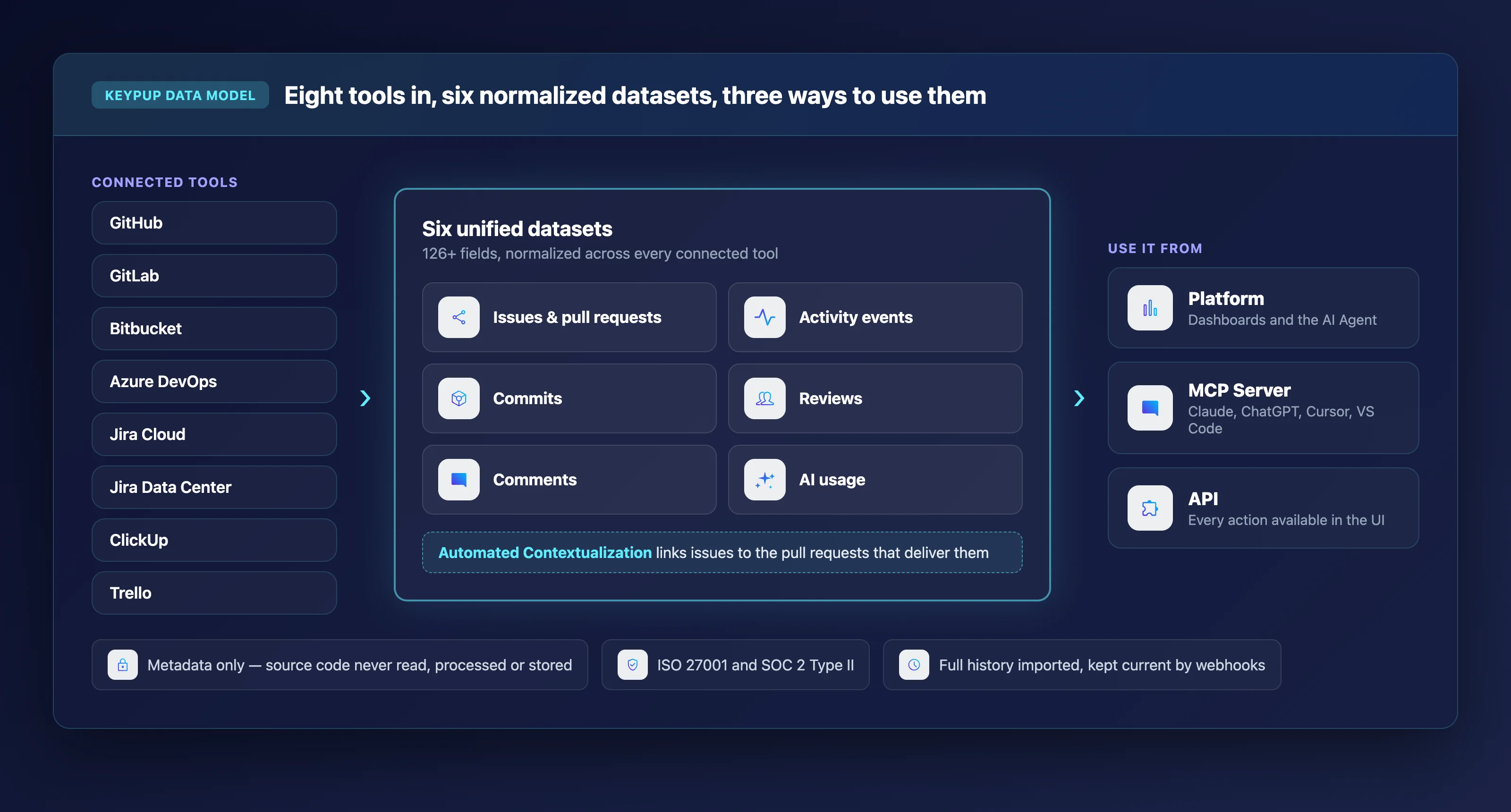
Keypup unifies Git and ticketing data into six normalized datasets and serves them through a platform, an MCP Server, and an API. Where most platforms give you dashboards to interpret, Keypup gives you an AI Agent that builds dashboards from a plain English prompt, analyzes the results, identifies root causes, and recommends specific actions you can track over the next sprint.
The platform connects to GitHub, GitLab, Bitbucket, Azure DevOps, Jira Cloud, Jira Data Center, ClickUp, and Trello through read-only integrations. It imports your full history and keeps data current through webhooks. Keypup processes metadata only. Your proprietary source code is never read, processed, or stored.
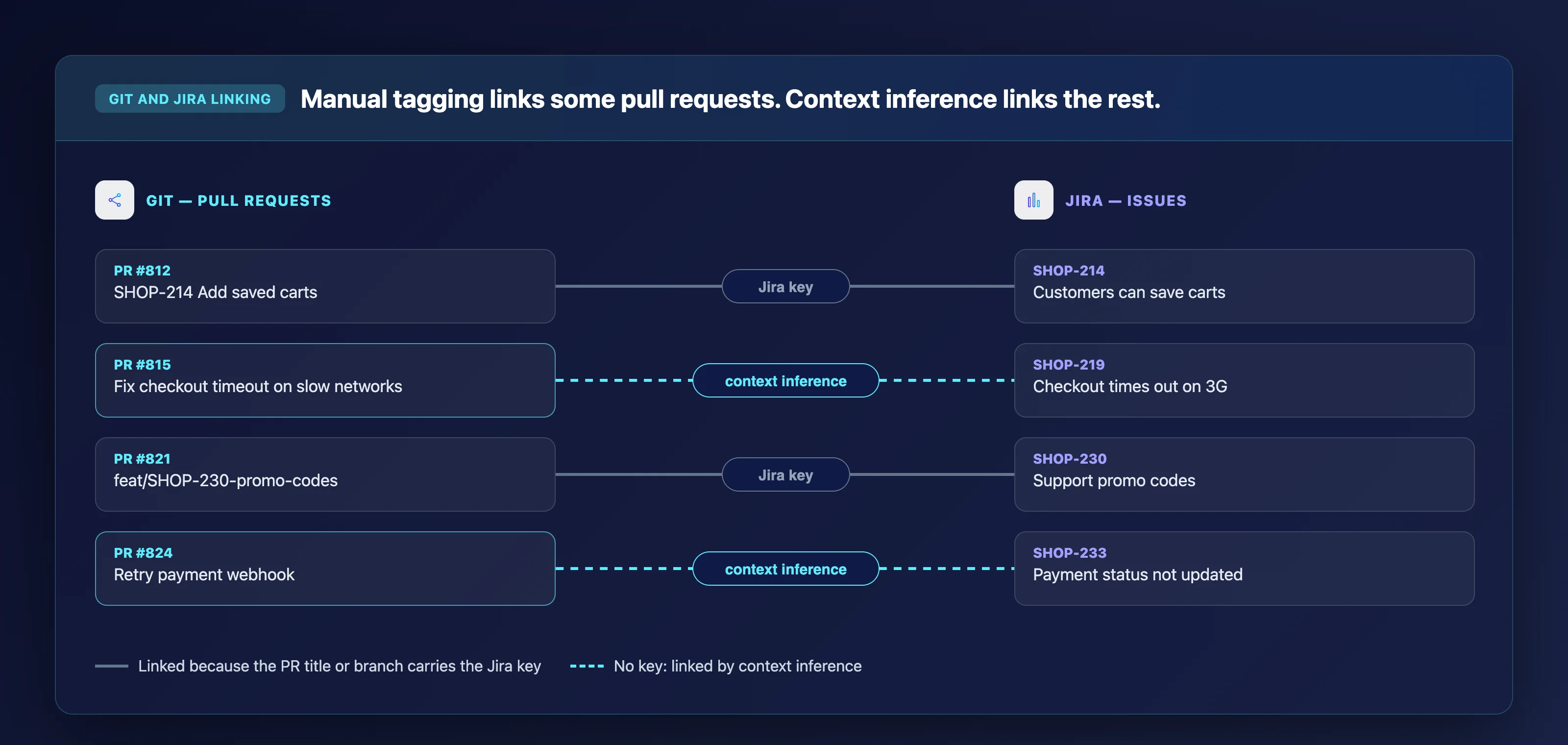
What sets Keypup apart is Automated Contextualization. The platform links issues to pull requests using context inference, so you do not need to manually tag every PR with a Jira key. That correlation powers DORA Metrics, Issue Cycle Time, and Team Benchmarking dashboards that reflect your actual delivery flow rather than a manual approximation of it.
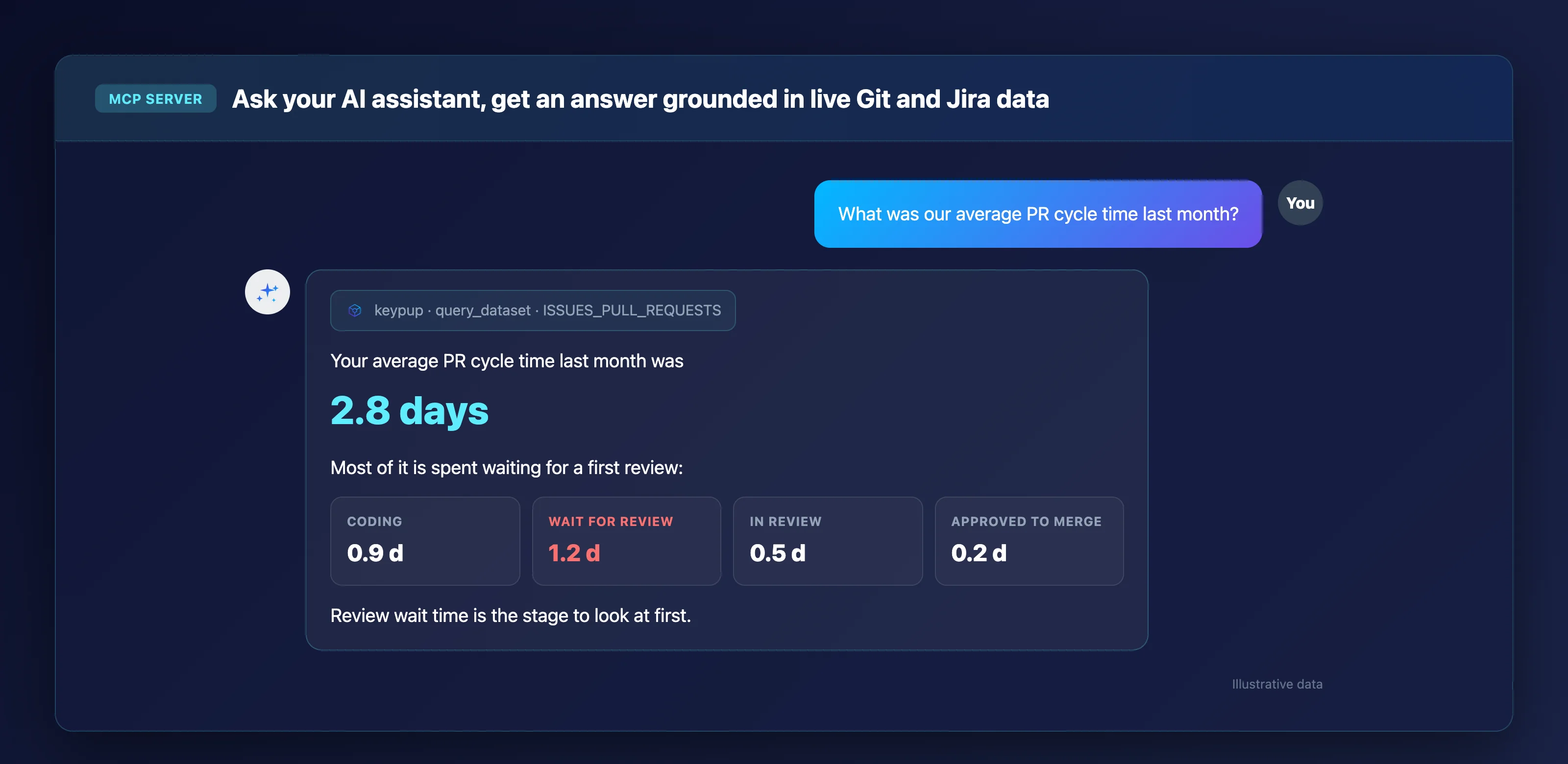
Keypup also exposes its reporting engine through an MCP Server, so Claude, ChatGPT, Cursor, VS Code, and other AI assistants can query your engineering data in natural language. Ask "What was our average PR cycle time last month?" and get a direct answer grounded in your live data.
Keypup features
AI Agent with diagnosis and recommendations: Describe what you want to measure. The agent builds the dashboard, explains the numbers, identifies bottlenecks (such as stale issues inflating cycle time), and proposes tracked improvement actions.
Custom formulas and insight editor: Define how your team calculates Lead Time for Changes, exclude weekends, adjust for your workflow statuses. Every metric matches your reality, not a vendor default.
MCP Server for any AI assistant: Plug Keypup into Claude, ChatGPT, or Cursor. The assistant discovers your datasets, builds queries, and returns analyzed results in conversation.
Six unified datasets with 126+ fields: Issues and pull requests, activity events, commits, reviews, comments, and AI usage data, all normalized across every connected tool.
Uncapped historical trend analysis: Keypup imports your full Git and Jira history. Compare this quarter to the same quarter two years ago without hitting a data retention wall.
ISO 27001 and SOC 2 Type II certified: Metadata-only processing means your source code stays in your repositories, not in a third-party platform.
Keypup pros and cons
Pros:
Keypup connects Git and Jira in minutes with automated data enrichment through context inference, removing the need for manual tagging.
The AI Agent moves beyond static dashboards to deliver root-cause diagnosis and tracked improvement actions from a single prompt.
The MCP Server lets you query engineering metrics from any AI assistant, making data accessible without opening a separate dashboard.
Cons:
AI usage tracking currently covers GitHub Copilot natively, with Claude and OpenAI support in beta.
On-premise deployment is not available; the platform runs as a cloud SaaS service.
The depth of customization in the insight editor may require an initial learning period for teams new to formula-based metric definitions.
2. LinearB: PR workflow automation with DORA tracking
LinearB connects to Git providers and issue trackers to measure cycle time, DORA Metrics, and PR throughput. The platform includes gitStream, an automation engine that routes, labels, and assigns pull request reviews based on rules you define. This workflow layer is where LinearB differs from pure analytics platforms.
The platform benchmarks your metrics against a dataset of over 8.1 million pull requests. That external reference point helps teams contextualize whether their cycle time is typical for their org size. LinearB offers a free tier for smaller teams and paid plans for organizations with 50 or more developers.
LinearB features
gitStream automation: Automates PR routing, labeling, and review assignment based on configurable rules, reducing manual triage.
External benchmarks: Compares your DORA and cycle time numbers against aggregated data from thousands of engineering teams.
WorkerB task automation: Handles repetitive development tasks so engineers can focus on code rather than process overhead.
LinearB pros and cons
Pros:
Includes a workflow automation layer (gitStream) alongside analytics, combining measurement with action.
Offers a free tier that gives smaller teams access to core DORA tracking without a paid commitment.
External benchmarks provide context for your metrics against a large cross-industry dataset.
Cons:
AI measurement capabilities are limited compared to platforms with dedicated AI adoption tracking.
Custom Jira field support is narrower than platforms built specifically around deep Jira integration.
Self-hosted deployment is not available; the platform operates as a cloud-only service.
3. Jellyfish: R&D investment reporting for engineering executives
Jellyfish maps engineering effort to business initiatives, making it a reporting tool for CTOs and VPs who present allocation data to the board. The platform tracks where engineering time goes across projects, and its investment profile features let you categorize effort by strategic initiative, maintenance, or unplanned work.
Capacity forecasting and business-context mapping round out a platform designed for financial conversations rather than day-to-day developer workflow. Jellyfish does not publish pricing publicly, and the sales cycle typically targets enterprise organizations.
Jellyfish features
Investment allocation: Categorizes engineering time by initiative type, giving executives a financial view of where R&D spend lands.
Capacity forecasting: Projects team availability based on historical patterns and current commitments.
AI adoption reporting: Tracks AI tool usage and its impact on engineering output at the team and tool level.
Jellyfish pros and cons
Pros:
Provides a financial lens on engineering work, translating Git and Jira activity into investment allocation percentages.
Capacity forecasting helps VPs plan headcount and project timelines using historical data.
AI adoption reporting gives visibility into which teams are using AI tools and how that correlates with output.
Cons:
The platform does not include workflow automation features like automated PR routing or review assignment.
Pricing is not published, and the sales process is oriented toward enterprise buyers.
Individual-level reporting is available, which may require internal governance to prevent misuse as a surveillance tool.
4. Swarmia: Developer-friendly DORA and SPACE metrics
Swarmia tracks DORA and SPACE framework metrics with a focus on developer experience. The platform defaults to team-level reporting and keeps individual data private to each developer. Working agreements let teams set their own targets for PR size, review turnaround, and other process indicators.
Swarmia integrates with 22 HRIS and payroll systems in addition to Git and Jira, enabling investment balance views that map engineering time to cost. A free tier covers teams of up to nine developers, with paid plans scaling from there.
Swarmia features
Working agreements: Teams define and track their own process targets, such as PR review turnaround or maximum PR size.
Investment balance: Maps engineering time and cost to categories like features, bugs, and maintenance using payroll integration.
Survey integration: Collects developer experience data alongside system metrics for a combined quantitative and qualitative view.
Swarmia pros and cons
Pros:
Team-level defaults and private individual data reduce the risk of metrics being perceived as surveillance.
Working agreements give teams ownership of their process improvement targets.
A free tier for teams of up to nine developers makes initial evaluation accessible.
Cons:
Dashboard customization is more limited than platforms that offer full formula editors and custom metric definitions.
The platform operates as a cloud-only service without a self-hosted option.
AI-assisted querying through natural language is not a primary interface, requiring manual dashboard navigation for most workflows.
5. Faros AI: Unified data graph for enterprise engineering operations
Faros AI builds a live engineering graph by connecting over 60 data sources, from Git providers and CI/CD pipelines to HR systems and incident management tools. The platform models engineering as an interconnected system, attributing token spend, code output, and delivery metrics to teams, projects, and initiatives.
Faros has shifted its focus toward AI engineering operations, offering token spend attribution, model route optimization, and a policy engine that enforces governance rules across the software factory. The platform is SOC 2 compliant and available on AWS Marketplace.
Faros AI features
60+ integrations: Connects to Git, CI/CD, issue trackers, HR systems, and AI coding tools in a single unified data model.
Token spend attribution: Maps AI tool costs to sessions, PRs, teams, and outcomes, moving beyond seat-count tracking.
Policy engine: Enforces organizational policies such as model routing rules, budgets, and approved tools across engineering teams.
Faros AI pros and cons
Pros:
Covers a wide range of data sources, consolidating engineering signals from more than 60 tools into a single graph.
Token-level AI spend attribution provides granular visibility into AI tool ROI by team and project.
Available on AWS Marketplace, simplifying procurement for organizations with existing AWS contracts.
Cons:
The breadth of integrations means the initial configuration can take longer than platforms with a narrower scope.
The platform does not offer a free tier; evaluation requires engaging with the sales team.
Natural language querying is limited compared to platforms with built-in AI agents for dashboard creation and analysis.
Pluralsight Flow aggregates historical Git data to generate reports on code churn, commit risk, and developer activity patterns. The platform provides investment profile features that categorize engineering time into new work, legacy refactoring, and maintenance.
Originally launched as GitPrime, Pluralsight Flow focuses on code-level metrics rather than full SDLC unification. The platform includes DORA metrics reporting and sprint movement tracking, but its primary lens is the code repository rather than the Jira board.
Pluralsight Flow features
Code churn and commit risk analysis: Identifies unstable code patterns and high-risk commits that correlate with production issues.
Investment profiling: Breaks down engineering effort into new features, maintenance, and refactoring categories.
Pull request workflow visualization: Tracks PR review times, unreviewed requests, and resolution trends over time.
Pluralsight Flow pros and cons
Pros:
Deep Git-level metrics provide visibility into code quality indicators like churn and commit risk.
Investment profiling helps leaders understand the balance between new feature work and technical debt.
Sprint movement reports give insight into planning predictability across sprints.
Cons:
The platform focuses primarily on Git data, with less depth on Jira workflow metrics and custom field support.
Natural language querying and AI-assisted analysis are not available as primary interfaces.
The platform has not published significant feature updates recently, and its long-term product direction is less visible than newer entrants.
Comparison table: The best engineering analytics tools for Jira and Git
Engineering analytics tools for Jira and Git at a glance
Platform
AI-Powered Analysis
Automated Git-Jira Linking
Custom Formula Editor
KeypupTop pick
AI-Powered AnalysisAI Agent + MCP Server
Automated Git-Jira LinkingContext inference
Custom Formula Editor
LinearB
AI-Powered AnalysisLimited
Automated Git-Jira Linking
Custom Formula Editor
Jellyfish
AI-Powered AnalysisAnalytics
Automated Git-Jira Linking
Custom Formula Editor
Swarmia
AI-Powered Analysis
Automated Git-Jira Linking
Custom Formula Editor
Faros AI
AI-Powered AnalysisMCP Server
Automated Git-Jira Linking
Custom Formula Editor
Pluralsight Flow
AI-Powered Analysis
Automated Git-Jira Linking
Custom Formula Editor
How do engineering analytics tools unify Git and Jira data?
Engineering analytics platforms connect to your Git providers and Jira instance through APIs and webhooks. They pull metadata about commits, pull requests, branches, issues, sprints, and status transitions.
The platform then normalizes this data into a shared schema so that a GitHub pull request and a Jira issue can appear in the same report.
The real differentiator is how each platform links code activity to project management items. Some require you to include a Jira key in every commit message or PR title. Others, like Keypup, use context inference to automatically associate pull requests with the issues they resolve, even when tagging conventions are inconsistent.
Automated linking matters because manual tagging breaks down at scale. When your team grows past a few dozen engineers, the percentage of unlinked PRs climbs, and your cycle time and throughput numbers become unreliable. A platform that handles this correlation for you keeps your metrics grounded in reality.
What DORA Metrics should VP Engineering teams track first?
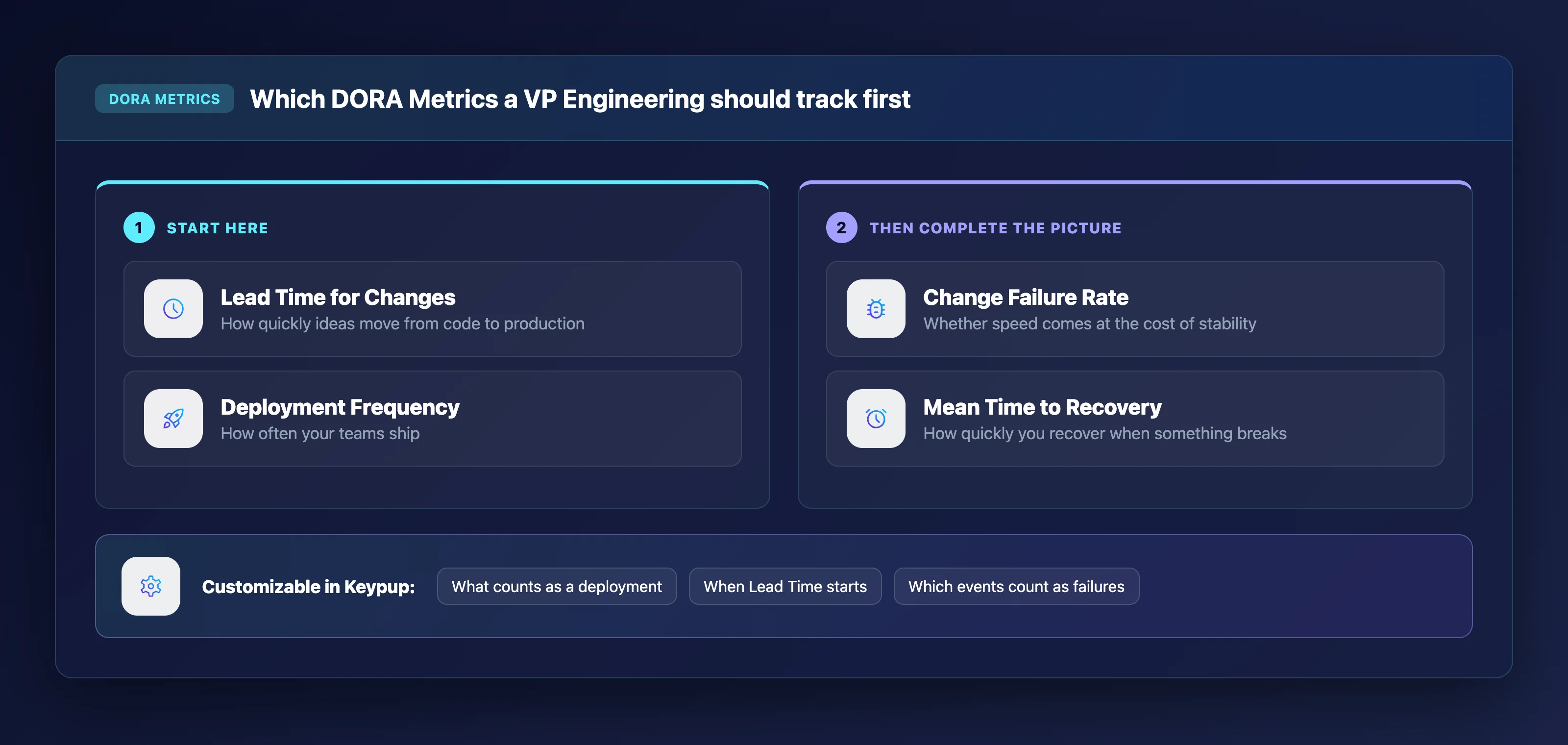
Start with Lead Time for Changes and Deployment Frequency. These two metrics give you immediate visibility into how quickly ideas move from code to production and how often your teams ship.
According to the DORA 2025 report by Google, AI amplifies the strengths of high-performing organizations and the dysfunctions of struggling ones. Tracking Lead Time for Changes reveals whether AI-assisted coding translates into faster delivery or pushes bottlenecks downstream into review and QA.
Change Failure Rate and MTTR complete the picture. Change Failure Rate tells you whether the speed gains come at the cost of stability. MTTR measures how quickly your team recovers when something breaks. Together, these four metrics give a VP Engineering a balanced view of velocity and quality.
Keypup tracks all four DORA Metrics out of the box, with the ability to customize how each one is calculated. You can define what counts as a deployment, when Lead Time starts, and which events qualify as failures, so the numbers reflect your actual process rather than a generic default.
Why Keypup is the best engineering analytics platform for Jira and Git
Most engineering analytics platforms stop at the dashboard. They show you numbers, and you figure out what they mean on your own. Keypup goes further.
Its AI Agent reads the results, names the bottleneck, and traces it to a root cause, such as stale issues inflating your average cycle time or review load concentrated on a single engineer. Then it proposes actions you can track over subsequent sprints.
Keypup delivers this depth because of how it handles data. The platform unifies Git and Jira into six normalized datasets covering 126+ fields, then enriches that data through Automated Contextualization that links issues to pull requests without manual tagging.
That enriched data model is what makes the AI Agent's diagnoses specific to your team rather than generic.
Integration speed reinforces the value. Keypup connects to GitHub, GitLab, Bitbucket, Azure DevOps, Jira Cloud, Jira Data Center, ClickUp, and Trello. Setup takes minutes, not months.
Your full history is imported on connection, so you can benchmark this quarter against prior periods immediately. Connect your tools to Keypup and ask the AI Agent your first cross-platform question today.
FAQs about engineering analytics tools for Jira and Git
What is engineering analytics software?
Engineering analytics software connects to your development tools, such as Git providers, Jira, and CI/CD pipelines, and turns their metadata into metrics you can act on. Keypup unifies this data into six datasets and uses an AI Agent to analyze results and recommend specific improvements.
How do engineering analytics tools track DORA Metrics?
They pull deployment events, commit timestamps, issue status changes, and incident data from your connected tools. The platform calculates Deployment Frequency, Lead Time for Changes, Change Failure Rate, and MTTR from that metadata. Keypup lets you customize each calculation with formulas that match your workflow.
Can engineering analytics platforms connect to multiple Git providers?
Yes. Most platforms in this guide support GitHub, GitLab, and Bitbucket. Keypup also connects to Azure DevOps, normalizing data from all providers into a shared schema so cross-repo and cross-tool reporting works without manual reconciliation.
Do engineering analytics tools access source code?
Responsible platforms process metadata only, such as timestamps, PR statuses, issue labels, and reviewer assignments. Keypup is strictly a metadata processor. Your proprietary source code is never read, processed, or stored.
How quickly can you set up an engineering analytics platform?
Setup time varies. Some platforms require weeks of configuration and data mapping. Keypup connects to your Git and Jira instances in minutes, imports your full history, and provides pre-built dashboard templates so you can start analyzing data on day one.
What makes Keypup different from other engineering analytics tools?
Keypup combines AI-driven diagnosis with Automated Contextualization and a custom formula editor. Where other platforms show you charts, Keypup's AI Agent tells you why a metric changed, identifies the root cause, and recommends actions you can track. The MCP Server extends this to any AI assistant.
Ready to Transform Your Analytics?
Join teams already using AI to make data-driven decisions faster than
ever.
Why do some Jira tickets bounce between engineers and teams for weeks before anyone fixes them? Learn what engineering leaders on Reddit say about ticket reassignment churn at enterprise scale, and how Keypup MCP uses previous assignees, assignment dates, issue types, projects and linked pull request authors to measure how often tickets change hands, what each hand-off costs in cycle time, who actually wrote the code and which open tickets are being passed around right now.
Why do pull requests sit for days before anyone reviews them? Learn what engineering leaders on Reddit say about code review bottlenecks at enterprise scale, and how Keypup MCP uses review request dates, first review dates, approvals, reviewers and lines changed to measure your wait for first review, break cycle time into phases, find when requests get stuck, show who carries the review load and list the pull requests waiting right now.
Why do some engineering organizations spend every Friday shipping hotfixes? Learn what engineering leaders on Reddit say about hotfixes, reverts and firefighting at enterprise scale, and how Keypup MCP uses pull request branches, labels, titles, approvals, merge times and linked Jira issues to measure your emergency fix rate, when and where it runs, how it relates to skipped reviews and which unreviewed fixes need a second look.