The Hidden Queue: Why Most of Your Lead Time Happens Before the First Commit
Your pipelines got faster and your reviews got shorter, yet features still take months to reach customers. Learn what engineering leaders on Reddit say about work that waits weeks in Backlog, Ready for Development and To Do before anyone writes code, why delivery dashboards that start at the first commit miss it, and how Keypup MCP uses Jira workflow history, sprints and the commit and merge dates of linked pull requests to measure the queue in front of your code.
Liam Davis
•13 min read
Table of Contents
TL;DR: Most engineering dashboards measure delivery from the first commit: coding time, review time, time to merge. In large organizations, that is the short part. Work often waits far longer before anyone writes code — in Backlog, in Refinement, in Ready for Development, and in sprints it gets carried through without being started. This is the hidden queue. The Keypup MCP Server reads each Jira issue's creation date, workflow status history, sprint and past sprints, type, story points and assignees, and the first commit and last merge of the pull requests linked to it. Your AI assistant can then split lead time into the wait before the first commit and the code phase after it, show which teams and statuses hold the queue, whether it is growing while the code phase gets faster, how sprint carry-over hides it, and which issues in the current sprint have no code behind them yet.
Every engineering organization that has invested in faster CI, smaller pull requests and shorter reviews eventually hits the same wall. The delivery dashboard shows improvement every quarter. The business still says features take forever. Both are right — because they are measuring different clocks.
The Friction: The Clock Starts Before the Code
Ask a product leader when a feature "started" and they'll point at the day it was requested. Ask an engineering dashboard and it'll point at the first commit. In a team of eight, the gap is a few days. In an organization with 900 engineers, 50 Jira projects and a quarterly planning cycle, it becomes months — for structural reasons:
Delivery metrics start at the code. Coding time, pickup time, review time and DORA's lead time for changes all start at a commit. Nothing before it is measured.
Refinement creates inventory. Teams refine and estimate more work than they can start, so "Ready for Development" turns into a second backlog nobody owns.
Sprints hide the wait. An issue pulled into a sprint looks planned. If it isn't started, it rolls to the next sprint and still looks planned.
Every team optimizes its own segment. Product prioritizes, engineering builds, platform ships. Nobody owns the time between "approved" and "started".
The result is an organization that keeps making the fast part faster while the slow part grows.
Why This Matters: The Real Cost of the Hidden Queue
The Expectation Problem
Customers and executives experience lead time from request to release. If 70% of it happens before the first commit, a 30% faster review process changes what they feel by less than 10% — and engineering is told its improvements "don't show".
The Waste Problem
Every issue that sits in Ready for Development has already consumed refinement meetings, estimates and design reviews. When it finally starts months later, the context has changed, the estimate is stale and part of the refinement has to be redone.
The Planning Problem
Roadmap forecasts usually assume work starts when it's planned. If issues wait a median of four weeks after refinement, every forecast built on cycle time alone is short by that much — and the gap shows up as a missed quarter.
The Enterprise Discussion: What Engineering Leaders Are Actually Saying
"Our cycle time is great but nothing ships", "Ready for Dev is a graveyard" and "the business doesn't care about DORA" come up again and again wherever directors, engineering managers and delivery leads compare notes. The quotes below are representative of recurring threads on r/ExperiencedDevs, r/EngineeringManagers, r/agile and r/devops.
Director of Engineering, Logistics Platform (r/EngineeringManagers)
"We cut PR cycle time from four days to one. Leadership asked why features still take a quarter. When we finally looked, most tickets sat for six weeks before anyone opened a branch. We'd been optimizing the wrong end."
"Our 'Ready for Dev' column has 300 tickets in it. Each one went through refinement, estimation, sometimes a design review. Half of them will be rewritten before anyone touches them. That's weeks of senior time spent preparing work that just sits there."
Head of Delivery, Retail Group (r/agile)
"The board says the story is in the sprint, so everyone assumes it's being worked on. Then it rolls over. Then it rolls over again. Three sprints later somebody opens the first PR, and the sprint report never showed any of it as late."
The pattern holds: leaders measure the code phase in detail, but almost nobody measures how long work waits before the code starts.
How Keypup MCP Measures the Hidden Queue
The Keypup Model Context Protocol (MCP) Server gives your AI assistant structured access to the data Keypup imports from Jira and from GitHub, GitLab, Bitbucket and Azure DevOps. For this analysis, what matters is each Jira issue's creation date, workflow status history — every status it entered and how long it stayed — its current workflow status, sprint and past sprints, type, story points, assignees and project, and, across the pull requests linked to it, the date of the first commit and of the last merge.
A pull request is linked to an issue when it references the issue key — in its title, or in its body or a commit message after a closing keyword such as "fixes" or "resolves". A delivered issue is one whose linked pull requests are all merged; issues without linked pull requests are left out, since their work can't be dated in Git. Lead time runs from the issue's creation to its last linked merge. It is split at the first commit: the wait before it is the hidden queue, the time after it is the code phase. Durations are in business days — Monday to Friday, 09:00 to 17:00 UTC by default; adjust the working hours and time zone to match your teams.
1. Splitting Lead Time at the First Commit
The first question: how much of lead time happens before anyone writes code?
MCP Prompt:
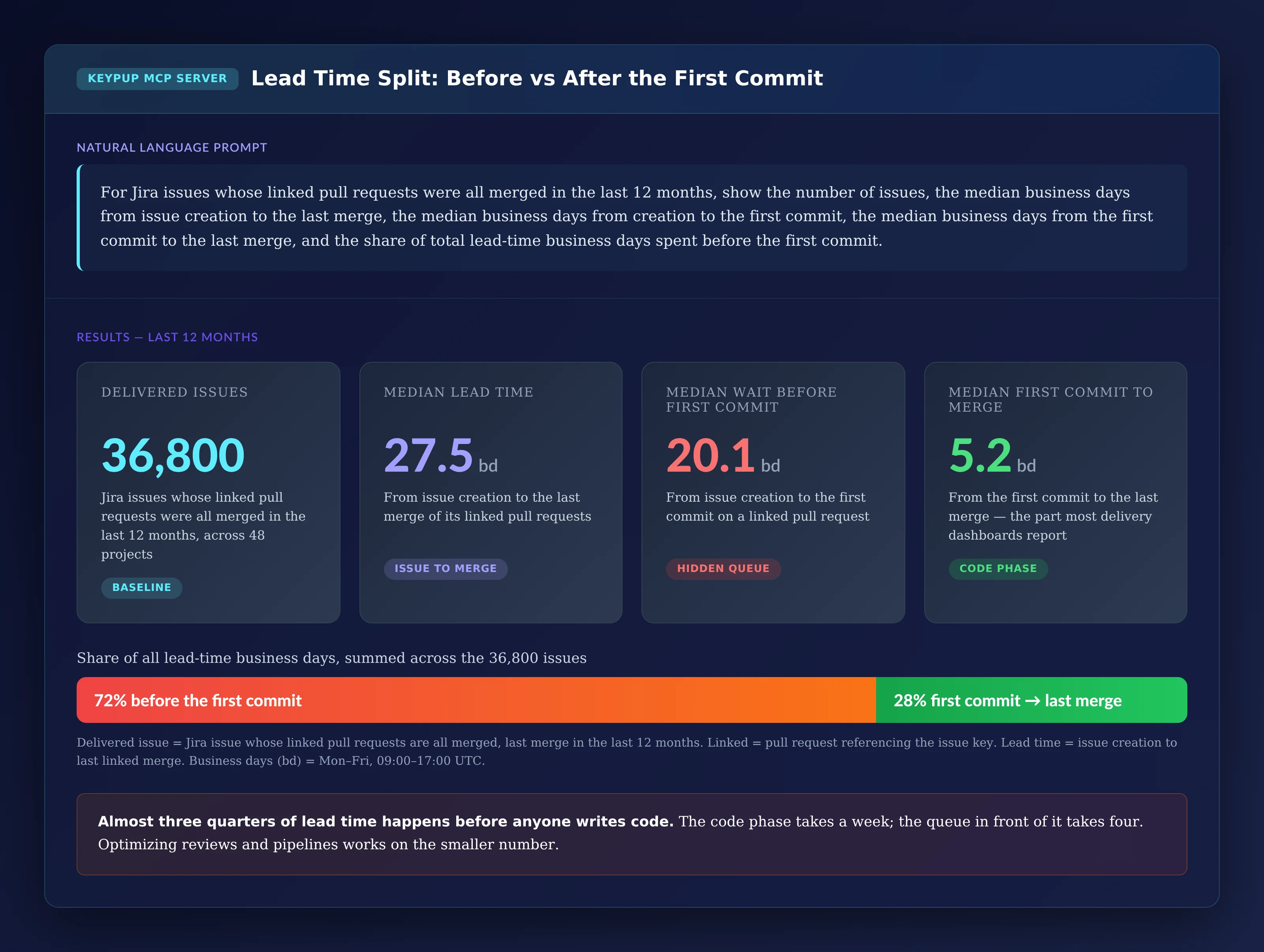
For Jira issues whose linked pull requests were all merged in the
last 12 months, show the number of issues, the median business
days from issue creation to the last merge, the median business
days from creation to the first commit, the median business days
from the first commit to the last merge, and the share of total
lead-time business days spent before the first commit.
Output: Lead Time Split — Before vs After the First Commit
Key Insight: Almost three quarters of lead time happens before the first commit. The code phase takes about a week; the queue in front of it takes four. Faster reviews and pipelines work on the smaller of the two numbers.
2. Breaking Lead Time Down by Team
An organization-wide median hides where the queue actually builds up.
MCP Prompt:
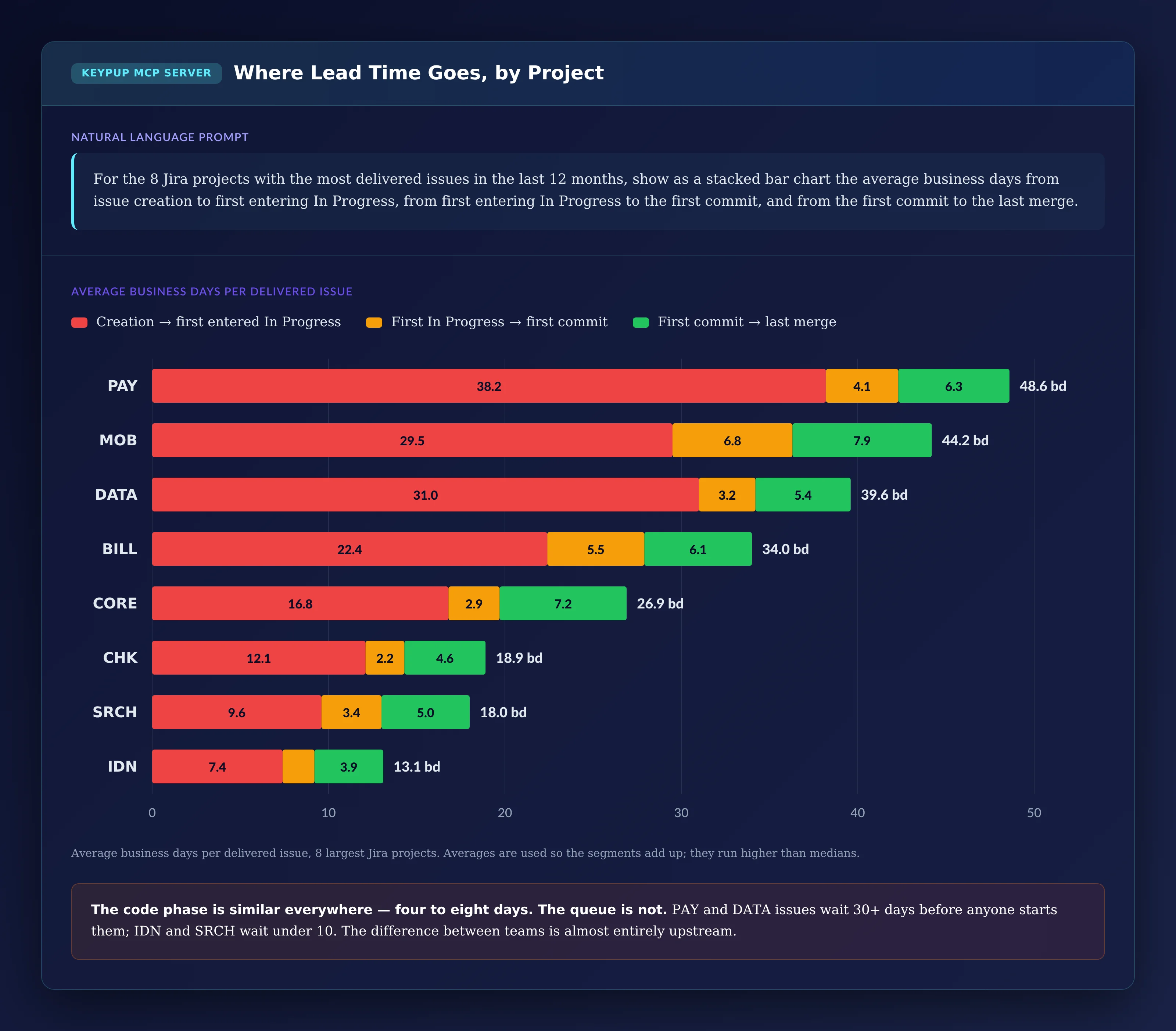
For the 8 Jira projects with the most delivered issues in the last
12 months, show as a stacked bar chart the average business days
from issue creation to first entering In Progress, from first
entering In Progress to the first commit, and from the first
commit to the last merge.
Output: Where Lead Time Goes, by Project
Key Insight: The code phase is similar everywhere — four to eight days. The queue is not: PAY and DATA issues wait more than 30 days before anyone moves them to In Progress, IDN and SRCH under 10. The difference between the fastest and slowest teams is almost entirely upstream. MOB's middle segment is also worth a look: almost seven days between "In Progress" and the first commit usually means work is started on the board before it is started in Git.
3. Checking Whether the Queue Is Growing
If the code phase improves while the queue grows, a dashboard that starts at the first commit will show the opposite of what customers feel.
MCP Prompt:
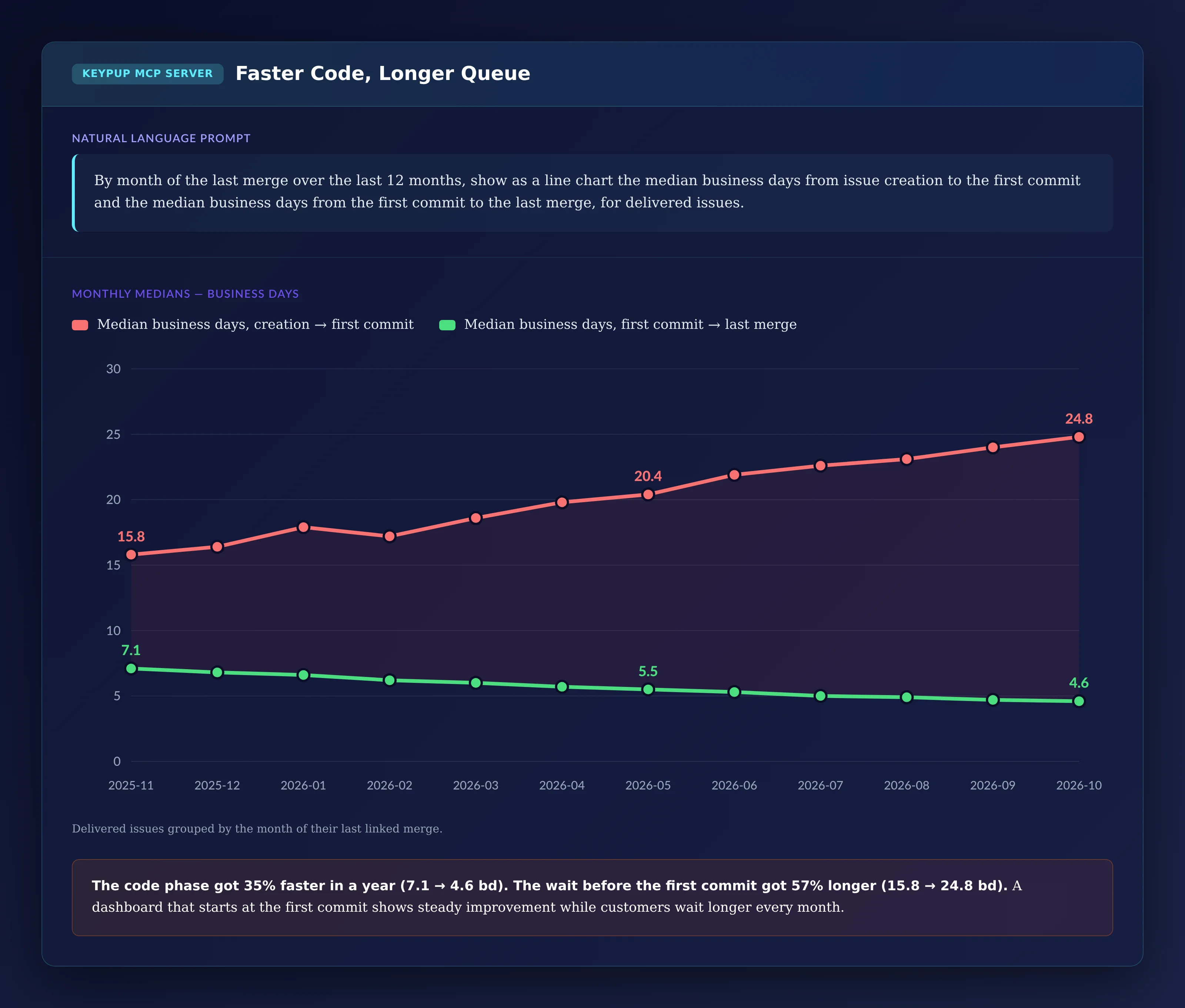
By month of the last merge over the last 12 months, show as a line
chart the median business days from issue creation to the first
commit and the median business days from the first commit to the
last merge, for delivered issues.
Output: Faster Code, Longer Queue
Key Insight: The code phase got 35% faster in a year. The wait before the first commit got 57% longer. Total lead time went up — while every code-phase metric on the dashboard improved.
4. Seeing How Long Issues Really Wait
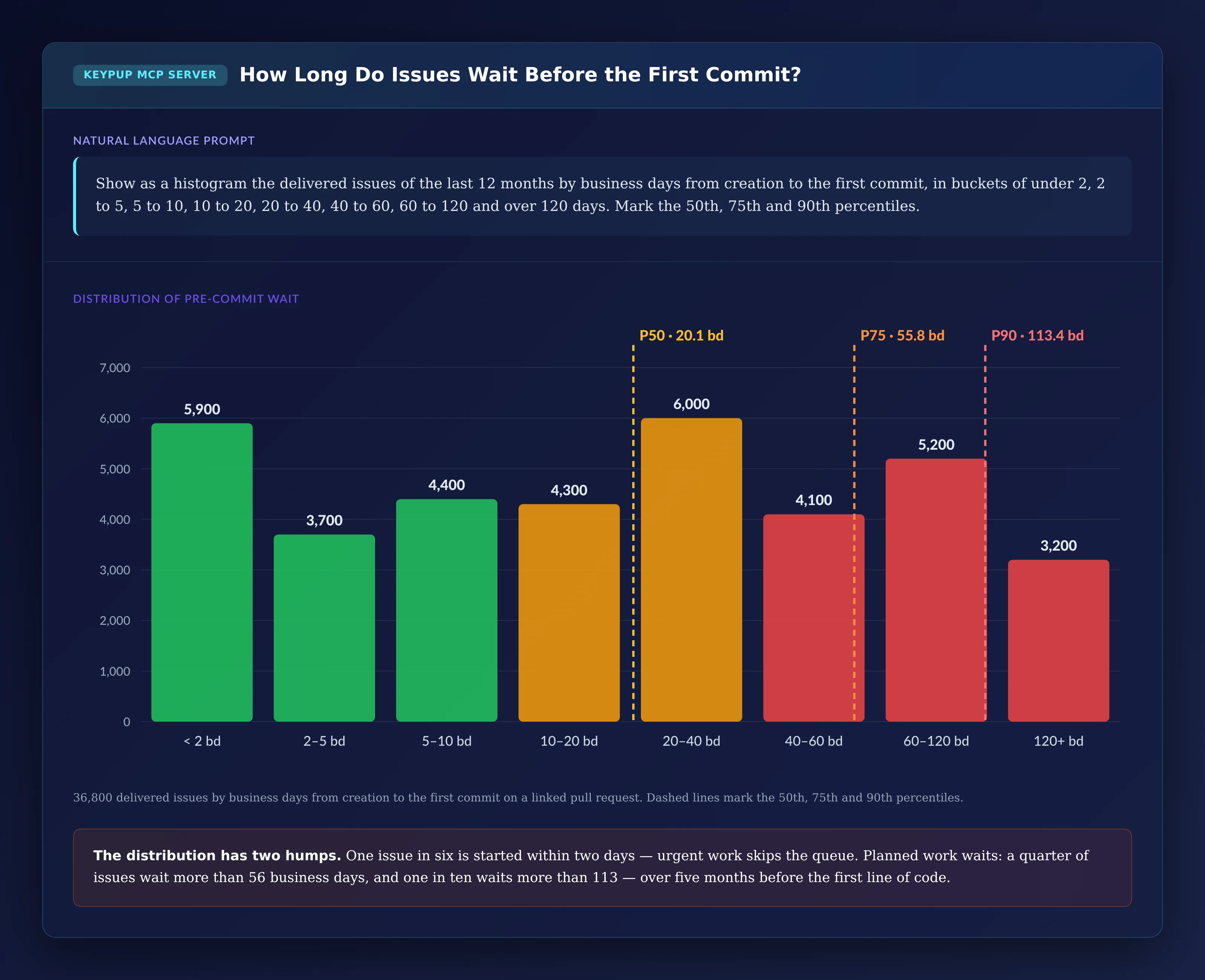
A median of 20 days can mean everything waits three weeks, or that half the work starts immediately and the rest waits months. The distribution tells you which.
MCP Prompt:
Show as a histogram the delivered issues of the last 12 months by
business days from creation to the first commit, in buckets of
under 2, 2 to 5, 5 to 10, 10 to 20, 20 to 40, 40 to 60, 60 to 120
and over 120 days. Mark the 50th, 75th and 90th percentiles.
Output: How Long Do Issues Wait Before the First Commit?
Key Insight: The distribution has two humps. One issue in six starts within two days — urgent work skips the queue. Planned work waits: a quarter of issues wait more than 56 business days and one in ten more than 113, over five months before the first line of code. Averages and medians alone hide both groups.
5. Finding Which Statuses Hold the Queue
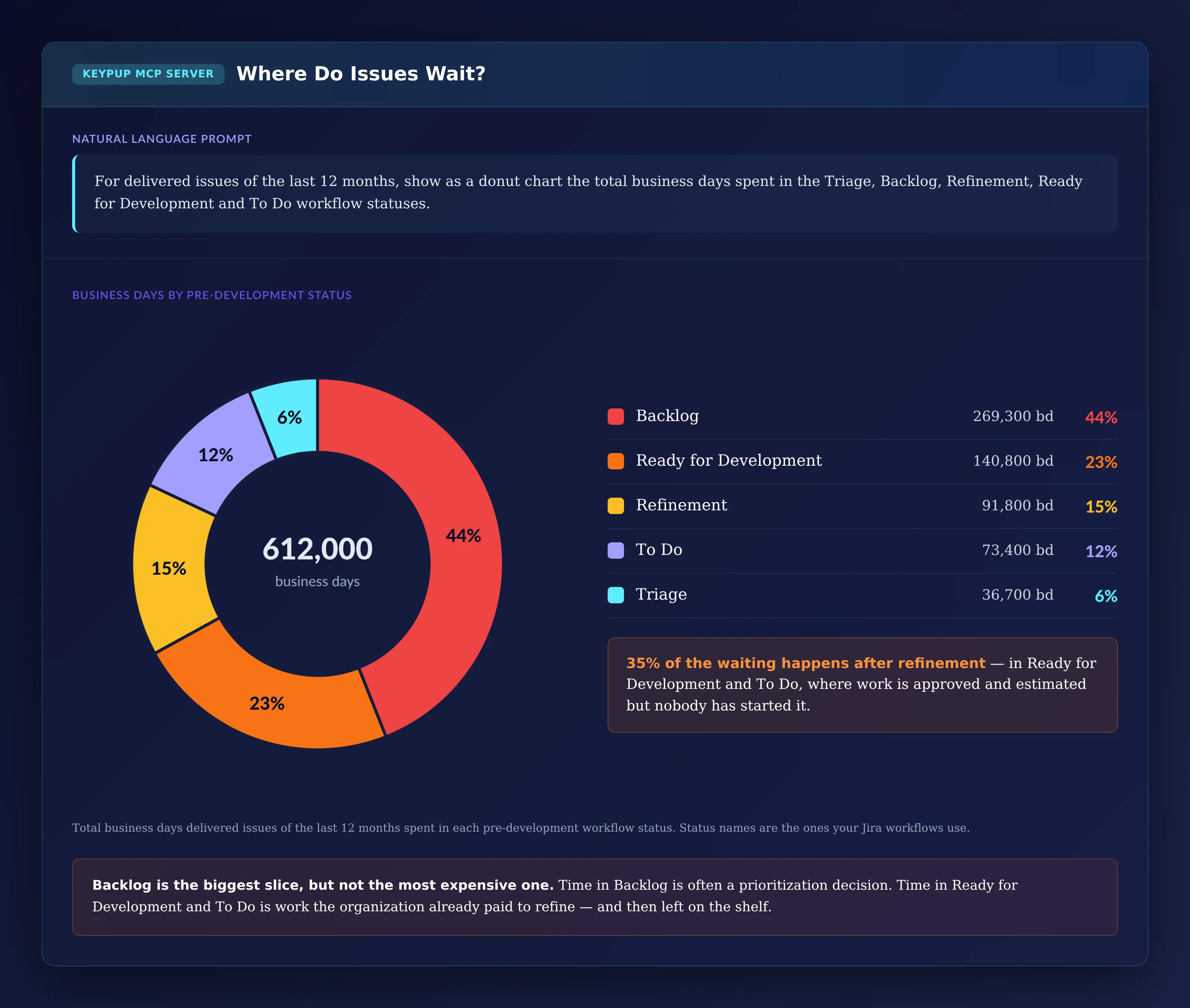
Not all waiting is equal. Time in Backlog is often a prioritization choice. Time after refinement is work the organization already paid to prepare.
MCP Prompt:
For delivered issues of the last 12 months, show as a donut chart
the total business days spent in the Triage, Backlog, Refinement,
Ready for Development and To Do workflow statuses.
Output: Where Do Issues Wait?
Key Insight: Backlog is the biggest slice, but not the most expensive one. More than a third of the waiting happens in Ready for Development and To Do — work that is approved, refined and estimated, then left on the shelf. That is where limiting work in progress upstream pays off first. The status names are the ones your workflows use: map yours before reading the split.
6. Checking Whether Sprint Carry-Over Hides the Queue
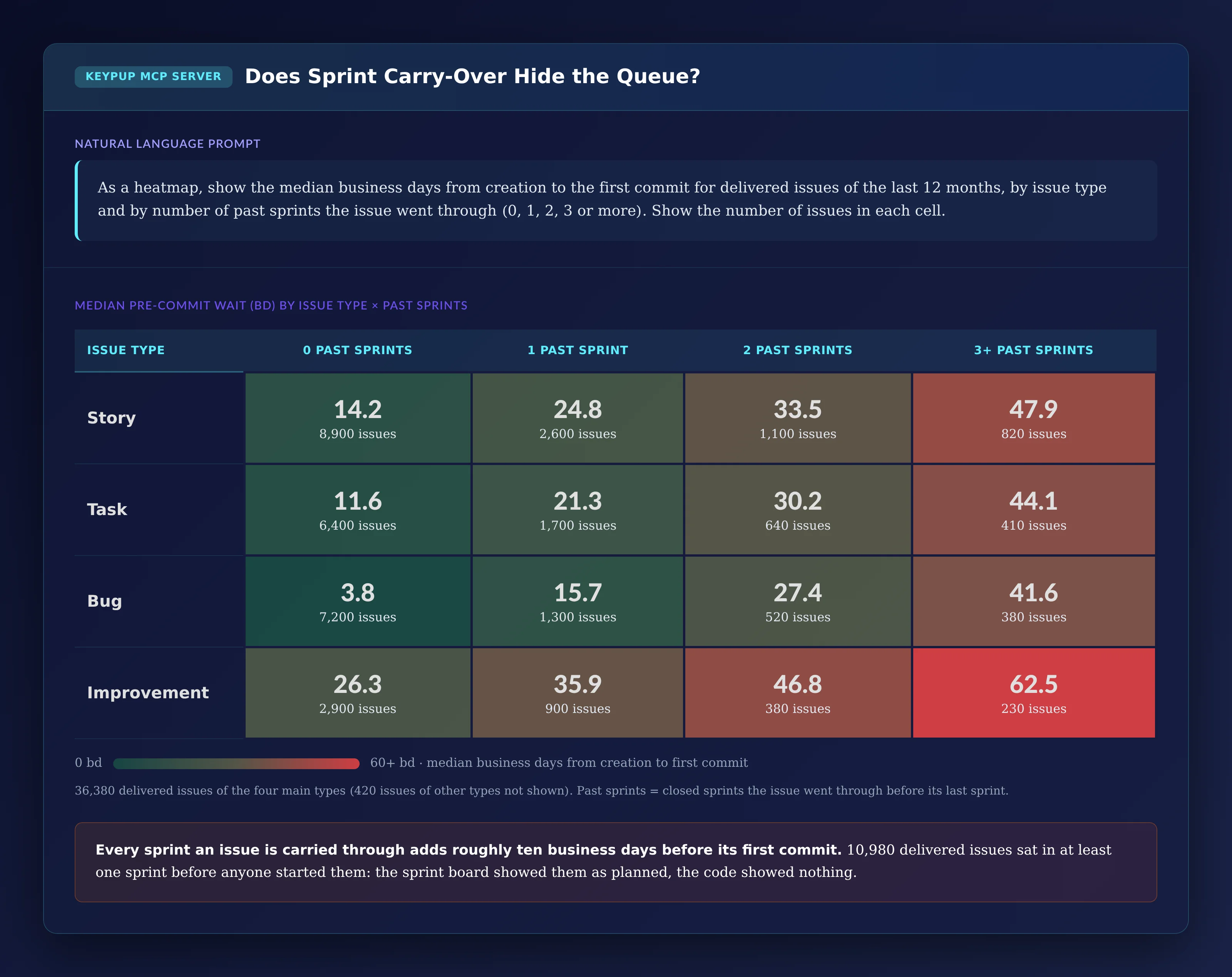
An issue in a sprint looks planned. The question is whether it is started.
MCP Prompt:
As a heatmap, show the median business days from creation to the
first commit for delivered issues of the last 12 months, by issue
type and by number of past sprints the issue went through (0, 1,
2, 3 or more). Show the number of issues in each cell.
Output: Does Sprint Carry-Over Hide the Queue?
Key Insight: Each sprint an issue is carried through adds roughly ten business days before its first commit. 10,980 delivered issues went through at least one sprint before their last one: the sprint board showed them as planned while nothing existed in Git. Bugs carried over lose their usual head start entirely — a bug carried through two sprints waits as long as a story.
7. Listing Sprint Work With No Code Behind It
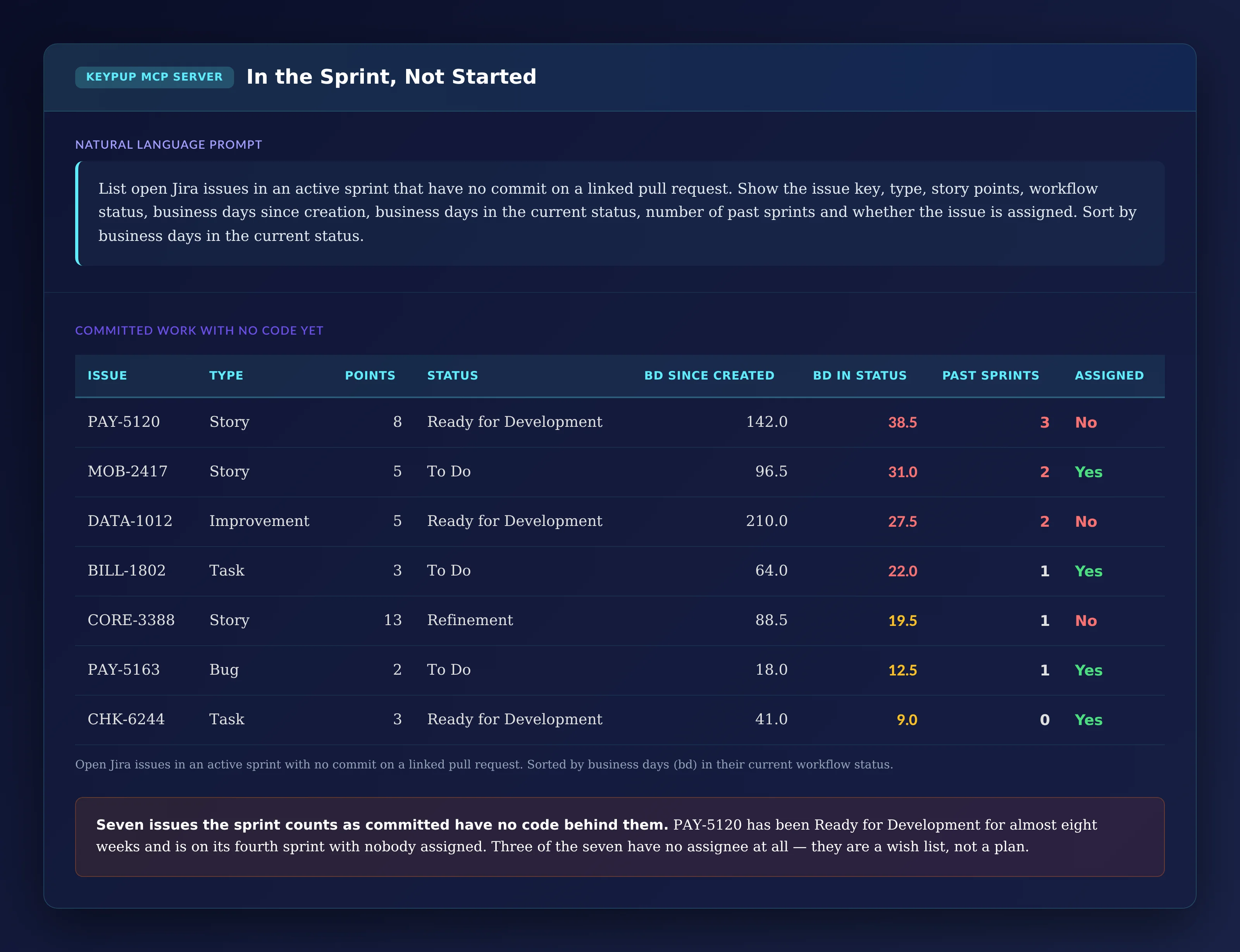
The last step turns the analysis into a list someone can act on in the next planning session.
MCP Prompt:
List open Jira issues in an active sprint that have no commit on
a linked pull request. Show the issue key, type, story points,
workflow status, business days since creation, business days in
the current status, number of past sprints and whether the issue
is assigned. Sort by business days in the current status.
Output: In the Sprint, Not Started
Issue
Type
Points
Status
Since Created (bd)
In Status (bd)
Past Sprints
Assigned
PAY-5120
Story
8
Ready for Development
142.0
38.5
3
No
MOB-2417
Story
5
To Do
96.5
31.0
2
Yes
DATA-1012
Improvement
5
Ready for Development
210.0
27.5
2
No
BILL-1802
Task
3
To Do
64.0
22.0
1
Yes
CORE-3388
Story
13
Refinement
88.5
19.5
1
No
PAY-5163
Bug
2
To Do
18.0
12.5
1
Yes
CHK-6244
Task
3
Ready for Development
41.0
9.0
0
Yes
Key Insight: Seven issues the sprint counts as committed have no code behind them. PAY-5120 has sat in Ready for Development for almost eight weeks, is on its fourth sprint and has nobody assigned. CORE-3388 is in the sprint while still in Refinement. Three of the seven have no assignee at all: they are a wish list, not a plan — take them out of the sprint or start them.
The Technical Implementation: What Keypup MCP Actually Reads
Every number above comes from fields Keypup already imports from Jira and your Git platforms. It helps to be precise about what they are — and what they aren't.
Links Come From Issue Keys
Keypup links a pull request to a Jira issue when the pull request references the issue key — in its title, or in its body or a commit message after a closing keyword such as "fixes", "closes" or "resolves". Each issue then carries the date of the first commit across its linked pull requests and the date of their first and last merge. Work done in pull requests that don't reference a key can't be dated, so check the share of merged pull requests linked to an issue before comparing teams: if it's low, start with a pull request title convention.
"First Commit" Is a Commit Date, Not a Push Date
The first commit date is the earliest commit on a linked pull request, as recorded in Git. A developer who commits locally and opens the pull request a week later still counts from the commit. A branch reused from older work can carry a commit dated before the issue was created; filter those out, or treat negative waits as zero, before computing averages.
Status Time Comes From Jira Workflow History
Keypup imports each issue's workflow timeline: every status it entered, when, and for how long. The time-in-status figures add up the business days spent in each status, including repeat visits. Status names are whatever your Jira workflows use, so a prompt that says "In Progress", "Ready for Development" or "Refinement" needs the names your projects actually have — and projects without a separate refinement or ready status will put all of that time in Backlog or To Do.
Sprints and Story Points Depend on How You Use Jira
Each issue carries its current sprint, with its state and dates, the list of past sprints it went through, and its story points. Teams that don't run Jira sprints won't appear in the carry-over view; teams that don't estimate will show empty points. The rest of the analysis doesn't depend on either.
The Code Phase Ends at the Merge, Not the Deployment
The last date Keypup sees is the merge of the last linked pull request. Keypup doesn't import deployment events, so the time from merge to production isn't part of these numbers. If you release on a fixed train, add that interval yourself when you talk about lead time to the business.
Business Days Come From a Formula, Not a Calendar
Keypup's BUSINESS_DAYS and TIMELINE_BUSINESS_DAYS functions count working time — Monday to Friday, 09:00 to 17:00 UTC by default — and accept a different time zone, working hours and working days. They don't know about public holidays or vacations: Keypup doesn't import calendars.
Real-World Impact: Enterprise Case Studies
Case Study 1: European Payments Provider
Before Keypup MCP:
850 engineers across 46 Jira projects and 310 repositories
Two years of investment in CI speed and review turnaround, reported quarterly as lead-time wins
Business stakeholders still estimating "about a quarter" for any new feature
After Keypup MCP:
The lead time split showed 71% of lead time before the first commit, which reframed the next investment from tooling to intake
The status view showed Ready for Development holding a quarter of all waiting time; teams capped the number of refined issues per team at two sprints of capacity
Median wait before the first commit fell from 22 to 12 business days in two quarters, with no change to the code phase
"We'd spent two years shaving days off the part we could see. Splitting lead time at the first commit showed us where the months were. The fix was a planning rule, not a tool."
— CTO, European Payments Provider
Case Study 2: North American Insurance Group
Before Keypup MCP:
1,200 engineers, 70 Scrum teams, two-week sprints
Sprint reports showing high commitment and steady velocity
Programs still slipping by one or two sprints at every milestone
After Keypup MCP:
The carry-over heatmap showed one delivered issue in three going through at least one sprint before it started; sprint planning now starts by removing issues carried over without a commit
The "in the sprint, not started" list became part of every mid-sprint check: anything on it after day three is either started, assigned or removed
Teams with the shortest queues shared their intake practices, starting with refining only what the next two sprints can absorb
"Our sprints looked full and our programs kept slipping. The list of sprint issues with no commit explained it in one screen. Now it's the first thing we look at in every planning meeting."
— VP Engineering, North American Insurance Group
Implementation: Getting Started with Keypup MCP
1. Connect Jira and Your Git Platforms
Connect Jira and GitHub, GitLab, Bitbucket or Azure DevOps to Keypup. Issues, workflow history, sprints, pull requests and commits are imported automatically.
2. Check How Many Pull Requests Reference an Issue Key
Every number here depends on links. Ask your assistant for the share of merged pull requests linked to an issue, by repository. Where it's low, agree on a convention — the issue key at the start of every pull request title is the easiest to enforce.
3. Map Your Pre-Development Statuses
List the workflow statuses that mean triage, backlog, refinement, ready and to do in each project, and reuse the same list in every prompt so numbers stay comparable across teams and over time.
4. Connect the MCP Server to Your AI Assistant
Follow the MCP documentation to connect Keypup to Claude, ChatGPT, Cursor or any MCP-compatible assistant.
5. Report Both Halves of Lead Time
Run the lead time split and the trend to set a baseline. Then review the "in the sprint, not started" list at every planning session, check the status donut quarterly, and report the wait before the first commit next to the code phase wherever you report delivery speed.
Frequently Asked Questions
What is pre-commit wait time in software development?
Pre-commit wait time is the time between a work item being created and the first commit made for it. It covers triage, prioritization, refinement and the time approved work sits in Ready for Development or To Do. It is not included in coding time, review time or DORA's lead time for changes.
Why doesn't faster code review shorten lead time?
Because review is only part of the code phase, and in many large organizations the code phase is a minority of lead time. If most of the time is spent before the first commit, cutting review time by half barely changes what customers experience.
How do you measure how long Jira issues wait before development starts?
Compare each issue's creation date — or the date it entered a "ready" status — with the first commit on the pull requests linked to it, and add up the time it spent in each pre-development status from its workflow history. Keypup MCP does this from data it already imports, as long as pull requests reference the issue key.
Is the hidden queue the same as a large backlog?
No. A large backlog is a count of items. The hidden queue is time: how long delivered work waited before it started. A team can have a small backlog and a long queue if refined work sits in Ready for Development or rolls from sprint to sprint without starting.
The Bottom Line
A delivery dashboard that starts at the first commit measures the part of lead time your teams have already optimized. Keypup MCP shows the part in front of it:
✅ Splitting lead time at the first commit to show how much happens before any code is written ✅ Breaking the queue down by team, from creation to In Progress to the first commit ✅ Tracking whether the queue grows while the code phase gets faster ✅ Showing the full distribution of waits, with the percentiles averages hide ✅ Finding which workflow statuses hold the queue, including work already refined ✅ Measuring how sprint carry-over hides unstarted work ✅ Listing sprint issues with no code behind them before the next planning session
Software capitalization, client billing and R&D tax credits all run on Jira time logs that engineers fill in on Friday afternoon, from memory. Learn what engineering and finance leaders on Reddit say about time tracking nobody trusts, and how Keypup MCP compares Jira worklogs with linked pull requests, commits and merges to show when time is logged, how late it arrives, and which hours have code behind them.
Green on the outside, red on the inside. Learn what engineering leaders on Reddit say about Jira tickets moved to Done before the code ships, velocity that doesn't match delivery and status reports nobody trusts at enterprise scale, and how Keypup MCP compares each issue's closure date, workflow history and sprint with the state and merge dates of its linked pull requests to measure how much of your reported "Done" has no merged code behind it.
An approved pull request isn't always approved code. Learn what engineering leaders on Reddit say about commits pushed after approval, self-merges and bypassed branch protection at enterprise scale, and how Keypup MCP uses approval dates, last commit dates, approval counts, required approvals, mergers, target branches and build status to measure how much code reaches your protected branches without anyone reviewing what actually shipped.