Navigating Git Platform Migrations: How Keypup MCP Ensures Continuity and Data Integrity
Migrating from GitLab or Bitbucket to GitHub? Discover how Keypup's MCP Server helps engineering teams verify data integrity, maintain analytics continuity, and avoid common migration pitfalls through AI-powered natural language queries during platform transitions.
Liam Davis
•18 min read
Table of Contents
TL;DR: Git platform migrations from GitLab or Bitbucket to GitHub are fraught with hidden risks—lost labels, broken workflows, incomplete data transfers, and metrics discontinuity that can derail engineering operations for months. Keypup's MCP Server transforms this high-stakes transition from a risky leap into a controlled, verifiable process.
Key Point 1: Verify data integrity in real-time during migration with natural language queries that compare source and destination platforms repository by repository, checking that PR, issue and label counts match after the transfer.
Key Point 2: Maintain uninterrupted analytics and reporting by connecting both legacy and new platforms simultaneously, providing continuous visibility into engineering metrics throughout the transition period.
Key Point 3: Identify migration anomalies instantly—missing labels, count discrepancies, unmatched authors, or process deviations such as PRs merged without their required approvals—through conversational queries that would require days of manual audit work with traditional tools.
Introduction: The Hidden Landmines of Git Platform Migrations
Every year, thousands of engineering organizations decide to migrate their code repositories from GitLab or Bitbucket to GitHub, driven by factors like better ecosystem integration, improved collaboration features, or corporate standardization mandates. What should be a straightforward technical operation often becomes a months-long ordeal plagued by data loss, process disruption, and the terrifying realization that six months of historical analytics have vanished or become unreliable.
The stakes are higher than most leaders realize. A git platform isn't just a code storage system—it's the system of record for your entire development history, workflow automation, team collaboration patterns, and engineering intelligence. When migrations go wrong, the consequences cascade: sprint velocity metrics become unreliable, DORA metrics show inexplicable gaps, label-based workflows break silently, and teams lose the ability to analyze historical trends that inform future planning. Worse, these problems often remain hidden for weeks or months until someone asks, "Why do our cycle time reports show a 200% increase in March?" and discovers that the migration introduced silent data corruption.
Traditional migration approaches exacerbate these risks through their binary, "big bang" nature. Teams typically:
Export data from the source platform
Run migration scripts to import into the destination platform
Verify a handful of repositories manually
Switch teams over en masse
Discover problems weeks later when reporting fails
This approach offers no safety net, no continuous verification, and no way to maintain analytics continuity during the transition period. Engineering managers are forced to choose between delaying the migration (losing momentum and political capital) or accepting a "leap of faith" that risks losing irreplaceable engineering intelligence.
The Keypup MCP (Model Context Protocol) Server fundamentally changes this paradigm by enabling dual-platform connectivity and real-time verification through natural language. Instead of migrating blindly, engineering teams can connect both GitLab/Bitbucket and GitHub to Keypup simultaneously, run verification queries during migration, compare metrics across platforms, identify anomalies instantly, and maintain uninterrupted reporting throughout the entire transition. The MCP Server acts as a safety net, quality assurance system, and analytics bridge—transforming a risky migration into a controlled, verifiable process.
This article explores how Keypup's MCP Server solves the five critical challenges of git platform migrations: data integrity verification, label and metadata preservation, workflow continuity, analytics consistency, and post-migration auditing. Through real-world examples and practical MCP queries, you'll learn how to execute platform migrations with confidence, catching problems before they impact your team's ability to deliver.
The Migration Crisis: Why Platform Transitions Fail
Before diving into solutions, it's essential to understand why git platform migrations are uniquely challenging and why traditional tools provide inadequate support. The fundamental problem is that migration is treated as a one-time data transfer rather than a continuous verification and reconciliation process. This misconception leads to predictable failures.
The Data Loss Trap
Git platforms store far more than just code and commit history. Every platform maintains rich metadata—labels, milestones, custom fields, PR templates, review policies, automation rules, and team permissions—that give structure and meaning to your development workflow. During migration, this metadata is the first casualty.
Consider a typical scenario: Your team uses GitLab's sophisticated label system to categorize work—"priority::critical," "type::bug," "area::backend," "security-review-required." These labels power automated workflows, sprint reporting, and team dashboards. Your migration tool promises to transfer "all metadata," but what happens in practice?
DevOps Engineer at Mid-Sized SaaS Company
We migrated 450 repositories from GitLab to GitHub using a vendor-recommended tool. Everything looked fine initially—code was there, PRs were imported. Three weeks later our product manager asked why the sprint report showed zero 'priority::high' issues. We discovered that the migration tool had imported labels but stripped the :: namespace separator, converting 'priority::high' to 'priorityhigh'. Every dashboard, every filter, every automation rule that depended on our label structure was broken. We spent two months manually remapping 12,000 issues.
This isn't an edge case—it's the norm. Migration tools handle code excellently but treat metadata as an afterthought. Labels get mangled, custom fields disappear, PR descriptions lose formatting, and historical links break. The problem compounds when you realize that verifying this damage requires manually inspecting thousands of items across hundreds of repositories—a task so daunting that most teams skip it until users start complaining.
The Analytics Black Hole
The second major failure point is analytics continuity. Engineering teams rely on historical metrics to understand trends, forecast capacity, and identify improvement opportunities. When you migrate platforms, you typically face an impossible choice:
Option A: Keep analytics connected to the old platform and lose the ability to track current work after migration. Option B: Switch analytics to the new platform and lose access to historical baselines, creating a "before/after" discontinuity that makes trend analysis impossible.
Neither option is acceptable, but traditional analytics tools force this choice because they can only connect to one platform at a time. The result is what we call the "analytics black hole"—a period of weeks or months during migration where reliable engineering intelligence simply disappears.
VP Engineering at FinTech Startup
Our board wanted to understand if our engineering velocity was improving quarter-over-quarter. The honest answer was 'I have no idea' because we migrated from Bitbucket to GitHub mid-quarter. Our old analytics tool couldn't connect to both platforms simultaneously. We showed Q1 data from Bitbucket and Q2 data from GitHub, but the metrics were calculated differently, the repositories were renamed, and team structures had changed. The comparison was meaningless. We spent the entire board meeting defending data methodology instead of discussing strategy.
This analytics discontinuity isn't just embarrassing—it's operationally dangerous. Teams lose the ability to detect degrading performance, identify emerging bottlenecks, or validate that the new platform is actually improving (or at least maintaining) previous efficiency levels. You're flying blind precisely when you most need visibility.
The Silent Process Breakdown
The third failure mode is the most insidious: silent process breakdown. Git platforms aren't passive storage—they're active participants in your development workflow through branch protection rules, required reviews, automated checks, merge strategies, and integration triggers. During migration, these process controls often fail to transfer correctly or at all.
Teams discover weeks after migration that:
Branch protection rules weren't migrated, allowing direct commits to main branches
Required review policies were lost, letting PRs merge without approval
Automated CI/CD triggers failed to reconnect, causing deployments to skip quality gates
Custom merge strategies changed, introducing subtle bugs in the deployment pipeline
The terrifying part? These problems are invisible until they cause damage. A missing branch protection rule doesn't generate an alert—it just quietly allows the next untested commit to reach production. A broken CI/CD trigger doesn't fail loudly—it simply stops running tests, and your team doesn't notice until a customer-impacting bug ships.
Engineering Manager at Healthcare Tech Company
Six weeks after our GitLab to GitHub migration, we had a production incident caused by untested code reaching our main branch. During the post-mortem, we discovered that our branch protection rules—which required two approvals and passing CI checks—hadn't been recreated in GitHub. Nobody noticed because GitHub doesn't warn you about missing protection rules; it just happily accepts direct pushes. The migration tool had a checkbox for 'transfer branch rules' that we'd enabled, but it only worked for exact naming matches. We used 'main' in GitLab but GitHub defaulted to 'master' for legacy repos. The protection rules were imported but applied to the wrong branch. This should have been caught in verification, but how do you manually verify branch rules across 200 repositories?
The common thread across all these failure modes is the lack of continuous, comprehensive verification. Migration tools focus on data transfer but provide no mechanisms for ongoing validation, comparison, or anomaly detection. They assume that if the import script completes without errors, the migration was successful. This assumption is dangerously wrong.
The Keypup MCP Advantage: Dual-Platform Intelligence
Keypup's MCP Server solves migration challenges through a fundamentally different approach: dual-platform connectivity combined with AI-powered natural language verification. Instead of treating migration as a one-time transfer event, Keypup enables continuous monitoring, comparison, and validation throughout the transition period.
Here's how it works:
Connect Both Platforms: Add both your legacy platform (GitLab/Bitbucket) and destination platform (GitHub) as apps in Keypup simultaneously.
Unified Query Interface: Use the MCP Server to query engineering data across both platforms using natural language—"Compare PR count between GitLab and GitHub over the last week" or "Show me issues missing labels after migration."
Real-Time Verification: Run verification queries during and after migration to ensure data integrity, comparing source and destination platforms for completeness and accuracy.
Analytics Continuity: Generate reports that seamlessly combine historical data from the legacy platform with current data from the new platform, eliminating the analytics black hole.
Anomaly Detection: Identify migration problems instantly through conversational queries—missing labels, count discrepancies, incomplete transfers, process deviations—without manual inspection.
The power of this approach is its conversational simplicity combined with comprehensive coverage. Instead of writing custom scripts, building comparison dashboards, or manually inspecting thousands of items, engineering managers simply ask questions and receive immediate, data-driven answers. The MCP Server handles the complexity of querying multiple platforms, correlating data, and surfacing anomalies.
Two practical points to plan for during the overlap. First, Keypup treats the GitLab and GitHub copies of a repository as two separate projects with no shared ID: a repository with the same name in both apps is counted twice unless your queries and dashboards filter on the app, so always say which platform you want in your prompts. Second, both sets of projects count toward billing on the Full Platform Access plan (billed per connected project) for as long as both apps stay connected.
Let's explore specific migration challenges and how the MCP Server addresses them through practical examples.
Use Case 1: Pre-Migration Data Inventory and Baseline
Before migrating anything, successful teams establish a comprehensive baseline of what exists in the source platform. This baseline becomes the comparison point for post-migration verification—if 1,247 PRs existed in GitLab, exactly 1,247 PRs should exist in GitHub after migration. Traditional approaches require manual exports and spreadsheet comparisons; the MCP Server makes this trivial.
MCP Context
An engineering manager preparing for a GitLab to GitHub migration needs to establish a comprehensive inventory of what will be migrated: repositories, open PRs, closed PRs, issues, labels, and active contributors. This baseline will be used post-migration to verify nothing was lost.
Prompt to Keypup MCP Server
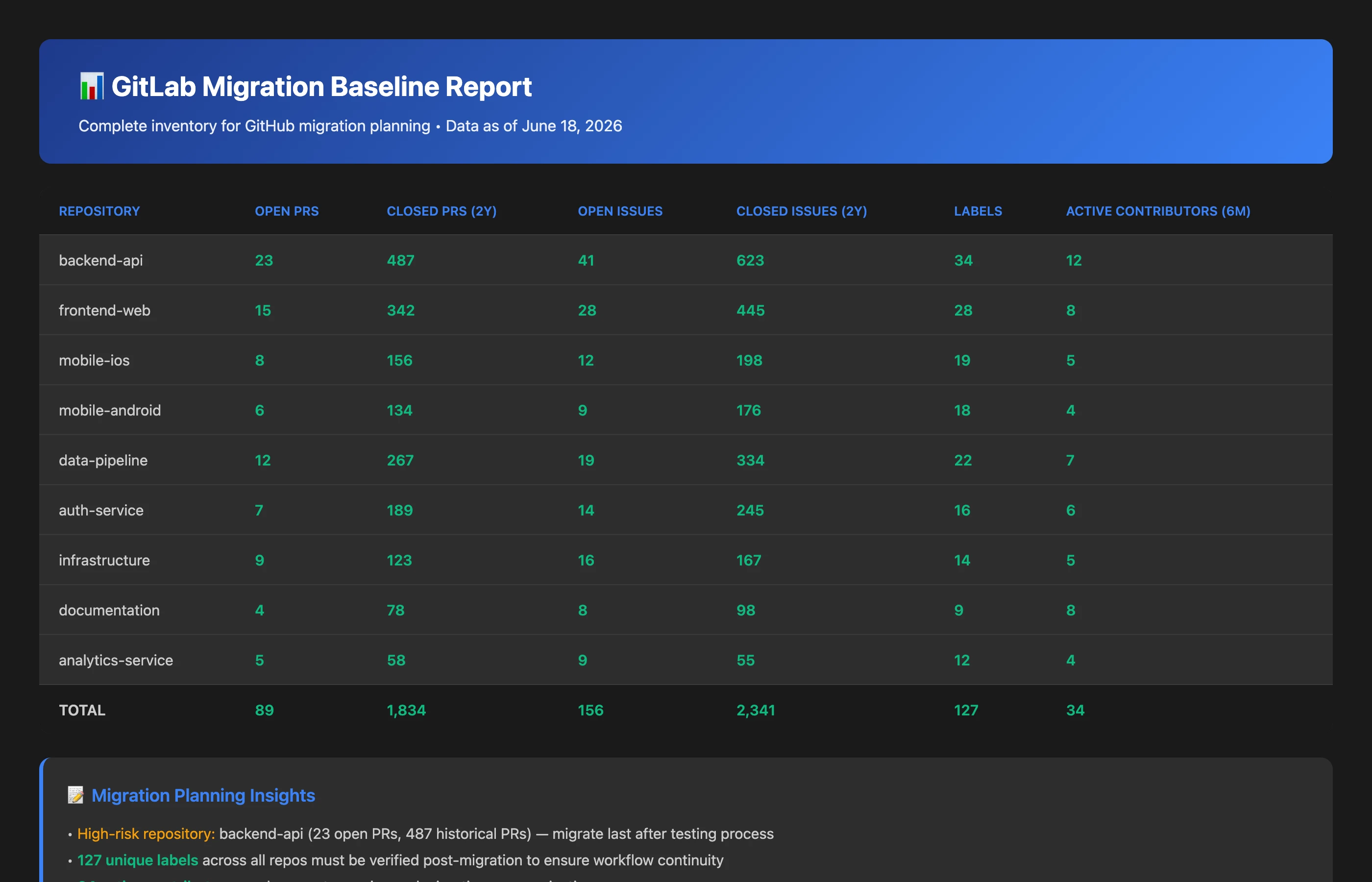
Create a comprehensive migration baseline report for all GitLab repositories. Include: total number of repositories, open pull requests, closed pull requests (last 2 years), open issues, closed issues (last 2 years), unique labels, and active contributors (last 6 months). Group by repository.
Key Insights: The MCP Server reveals that the organization has 47 repositories containing 89 open PRs, 1,834 closed PRs (last 2 years), 156 open issues, 2,341 closed issues, 127 unique labels across all repos, and 34 active contributors. The backend repository has the highest volume with 23 open PRs and 487 closed PRs, making it the highest-risk migration target.
Actionable Outcomes:
Migration Prioritization: Begin with smaller, low-activity repositories to test the migration process before tackling high-volume repos like backend.
Verification Checklist: Use these exact numbers as acceptance criteria—post-migration GitHub should show identical counts (accounting for time passage during migration).
Risk Assessment: The 127 unique labels represent significant risk; label migration must be verified meticulously as labels power workflows, automation, and reporting.
Team Communication: The 34 active contributors should be notified about migration timeline, account mapping requirements, and expected disruptions.
This baseline report takes seconds to generate with the MCP Server but provides the foundation for confident, verifiable migration. You've transformed a vague "let's migrate everything" into a specific, measurable plan with clear success criteria.
Use Case 2: Real-Time Migration Progress Verification
During active migration, engineering teams need continuous visibility into what's been transferred, what's still pending, and whether the transfer is accurate. Waiting until the entire migration completes to verify results risks discovering massive problems too late to fix efficiently. The MCP Server enables real-time comparison between source and destination platforms.
MCP Context
The engineering team is midway through migrating repositories from GitLab to GitHub in batches. The manager wants to verify that the first batch of 15 repositories was migrated completely and accurately before proceeding with the next batch. Specifically, they need to confirm PR counts, issue counts, and verify that no data was lost during transfer.
Prompt to Keypup MCP Server
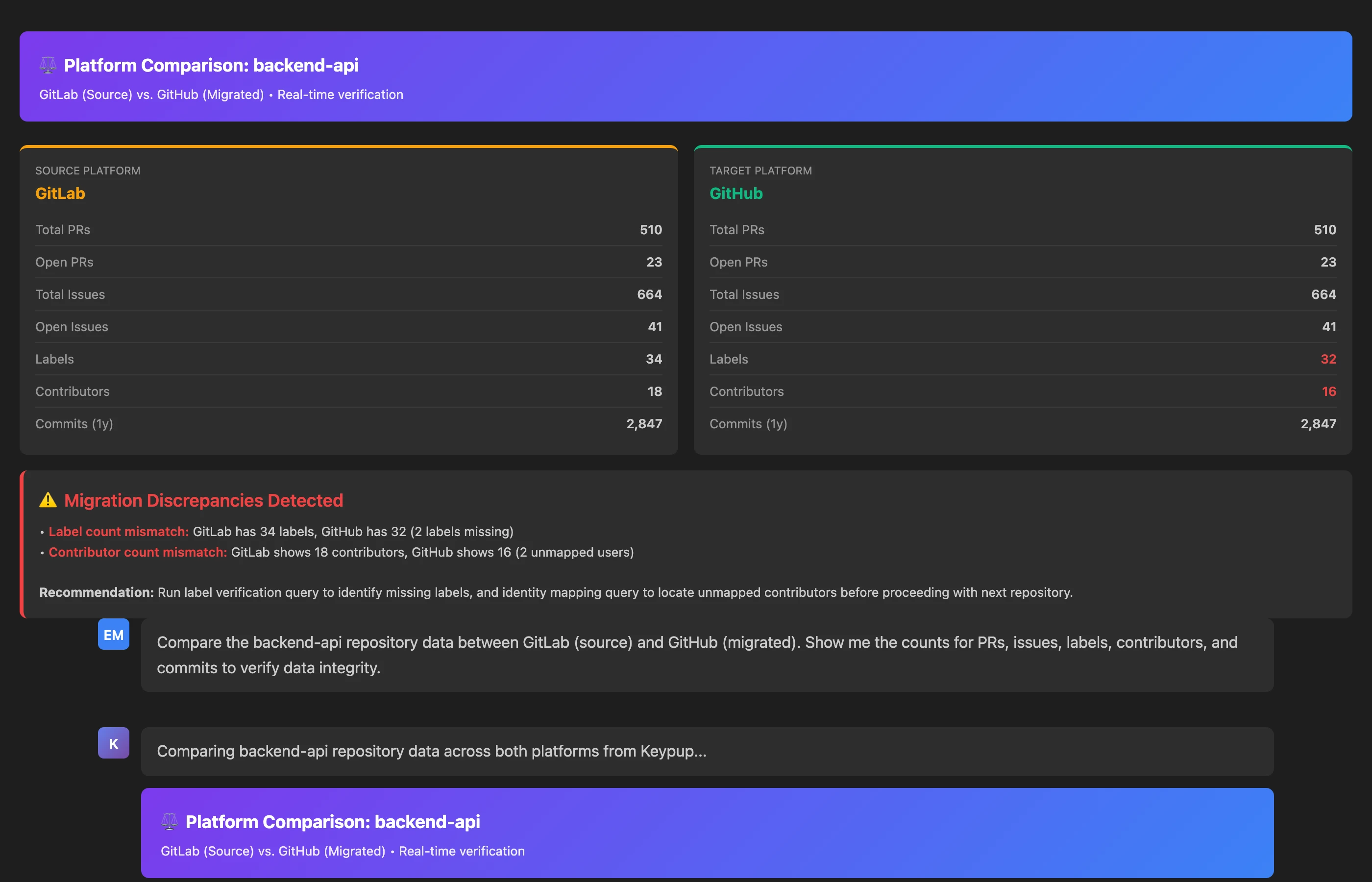
Compare the following repositories between GitLab and GitHub: [backend-api, frontend-web, mobile-ios, data-pipeline, auth-service]. For each repository, show: total PRs (all time), open PRs, closed PRs (last 2 years), total issues, open issues, closed issues (last 2 years). Flag any discrepancies.
Key Insights: The MCP Server comparison reveals that 4 of 5 repositories migrated perfectly with matching counts. However, the data-pipeline repository shows a discrepancy: GitLab has 23 open PRs but GitHub only shows 21 open PRs—2 PRs are missing from the GitHub migration. Additionally, auth-service shows 145 closed issues on GitLab but only 142 on GitHub.
Actionable Outcomes:
Immediate Investigation: The 2 missing PRs in data-pipeline require urgent investigation—were they excluded by migration filters, lost due to script errors, or still pending transfer?
Issue Deep-Dive: The 3 missing issues in auth-service might indicate a problem with migration date filters or label-based exclusions.
Hold Next Batch: Don't proceed with batch 2 until discrepancies in batch 1 are resolved and understood—these might indicate systematic problems that will compound with larger migrations.
Process Documentation: Once discrepancies are resolved, document the root cause and update migration procedures to prevent recurrence.
This real-time verification would be nearly impossible without the MCP Server's dual-platform connectivity. Traditional approaches require exporting data from both platforms, loading into spreadsheets, and manually comparing—a process taking hours and prone to errors. The MCP Server provides instant, accurate comparison through a simple natural language query.
Use Case 3: Label and Metadata Integrity Verification
Labels are the nervous system of modern engineering workflows—they drive automation, power search filters, organize work, and enable reporting. Label corruption during migration silently breaks countless downstream processes. The MCP Server can verify label integrity comprehensively, comparing label sets between platforms and how often each label is used in every repository.
MCP Context
Post-migration, the engineering manager needs to verify that all labels were transferred correctly from GitLab to GitHub and that label usage in each repository is unchanged. Label loss or corruption would break sprint reports, automation workflows, and team organization systems.
Prompt to Keypup MCP Server
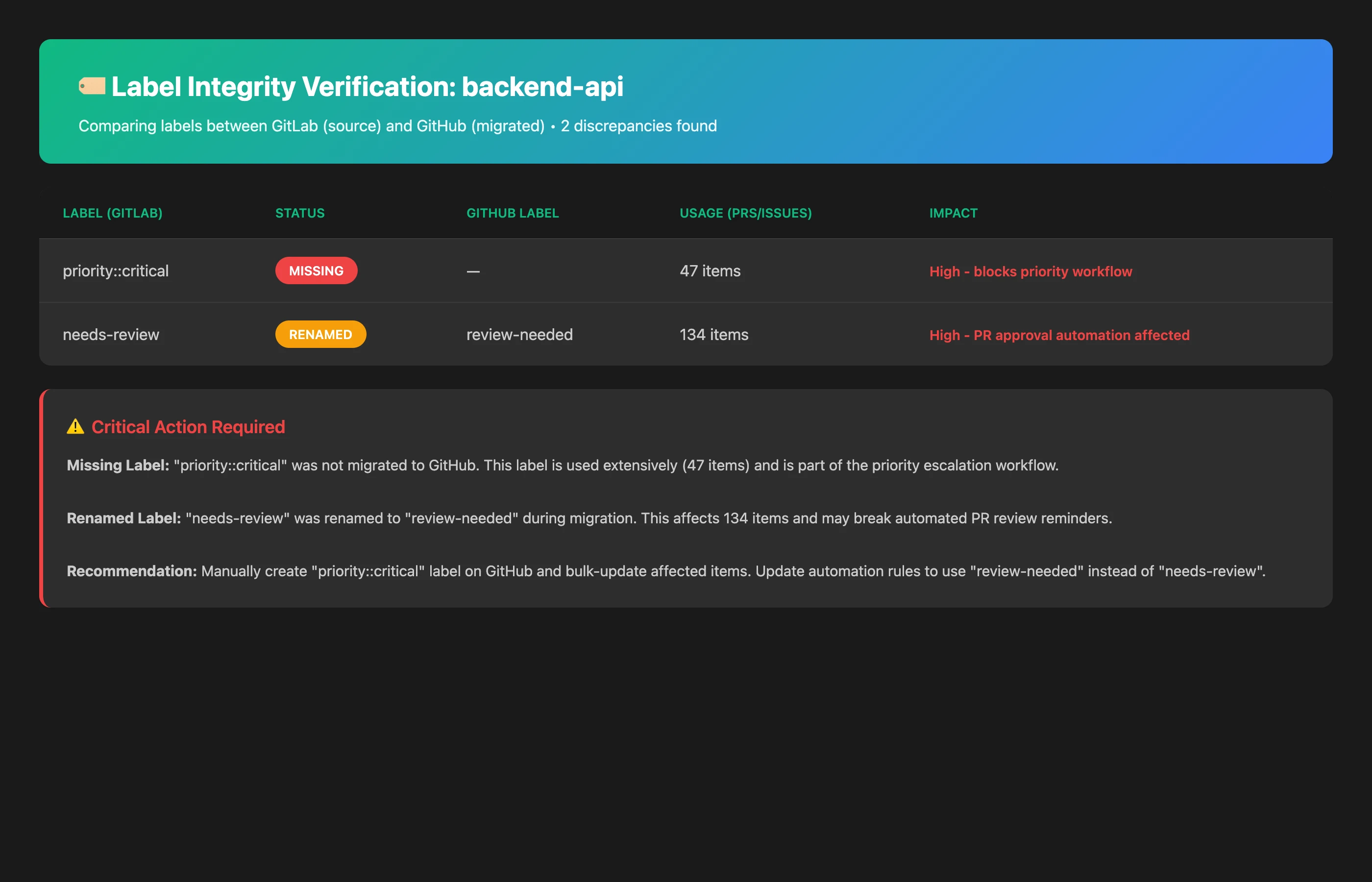
Compare the complete label set between GitLab and GitHub. List all labels that exist in GitLab but are missing from GitHub. Then, for each repository, compare the number of PRs and issues carrying each label in GitLab and in GitHub, and flag the labels whose counts dropped.
Key Insights: The MCP Server reveals a critical problem: 8 labels from GitLab are completely missing from GitHub, including important workflow labels like security-review-required, deployment-blocker, and technical-debt. Additionally, the per-repository label counts show 127 fewer labelled PRs and 43 fewer labelled issues in GitHub than in GitLab, suggesting systematic label stripping during migration.
Actionable Outcomes:
Immediate Label Recreation: Manually create the 8 missing labels in GitHub with identical names, colors, and descriptions to restore workflow functionality.
Mass Re-labeling: Use GitHub's API or bulk operations to restore missing labels on the affected PRs and issues. The per-repository counts tell you where to look; because GitLab and GitHub items share no ID in Keypup, your AI assistant can only pair individual items by title or number, so double-check that list before applying changes.
Root Cause Analysis: Investigate why labels were dropped—was it migration script limitations, character encoding issues, or namespace separator problems (e.g., priority::high becoming invalid)?
Validation of Downstream Systems: Check all automation workflows, sprint reports, and dashboards that rely on the missing labels—they're likely failing silently.
Migration Process Fix: Update migration procedures to preserve labels accurately before migrating remaining repositories.
Label problems are among the most common yet most damaging migration failures because they're invisible until critical workflows fail. The MCP Server's ability to perform comprehensive label audits in seconds provides the safety net that prevents this class of failures.
Use Case 4: Author and Identity Mapping Verification
Git platforms use email addresses and usernames to identify contributors. In Keypup, GitLab commit authors appear as the git email address used in the commit, while PRs and reviews carry platform usernames. During migration, identity mapping often breaks—commits attributed to [email protected] in GitLab might show as an unlinked email in GitHub if John hasn't connected his GitHub account or uses a different email. This breaks contribution tracking, code ownership, review assignment, and team analytics. The MCP Server can identify identity mapping gaps instantly.
MCP Context
After migration, the engineering manager notices that some PRs in GitHub show "ghost" users or unlinked email addresses instead of proper GitHub usernames. This indicates identity mapping failures that will break team analytics, code ownership tracking, and @mention notifications. They need to identify all unmapped contributors to fix identity links.
Prompt to Keypup MCP Server
Compare contributors between GitLab and GitHub. List the commit author emails and PR authors active in GitLab over the last 6 months, and flag those with no matching author in GitHub since the migration or who appear in GitHub only as an unlinked commit email. For each, show the commit email, the GitLab PR author where available, and the number of affected PRs.
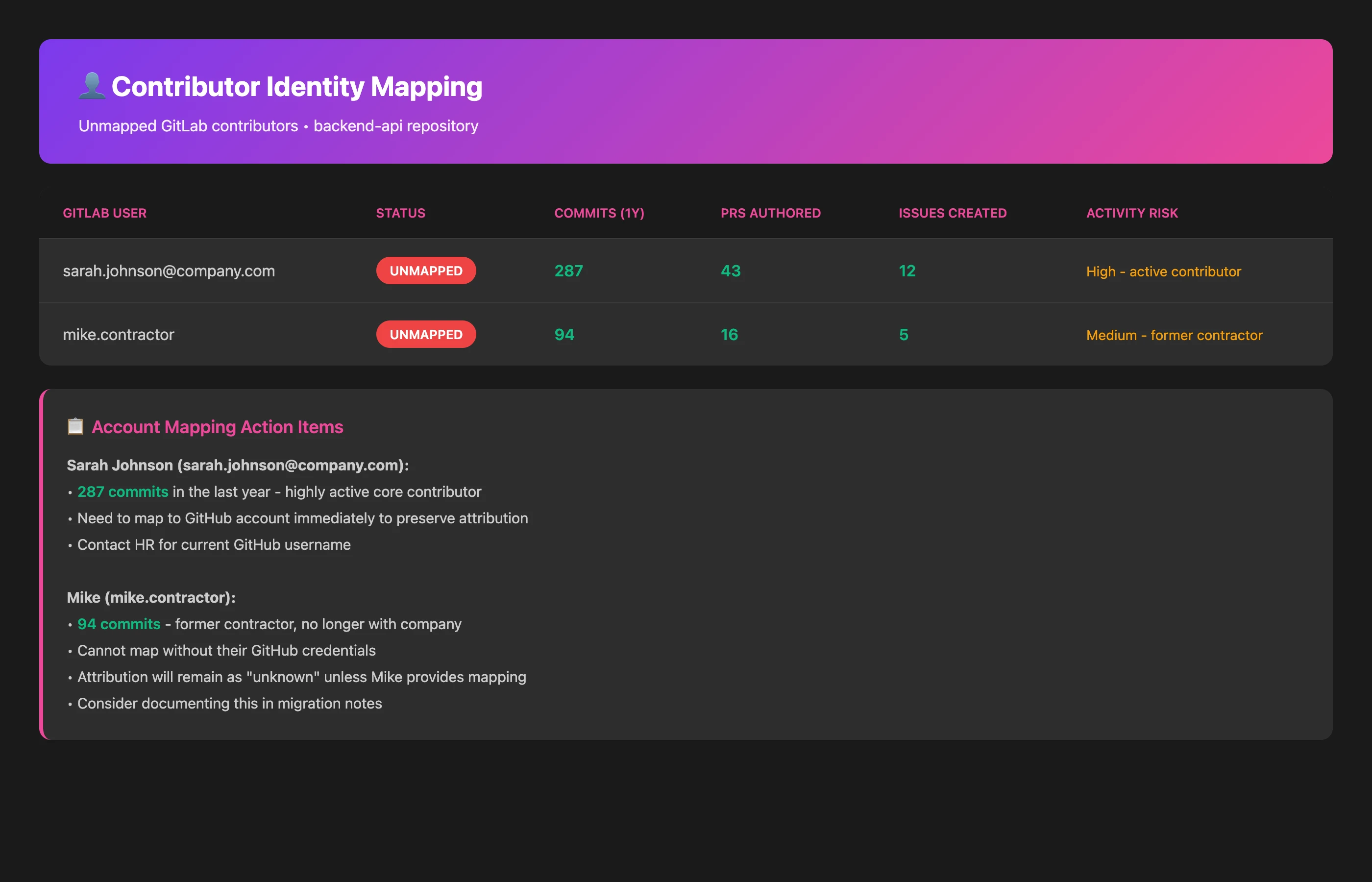
Key Insights: The MCP Server identifies 7 contributors whose identities failed to map correctly from GitLab to GitHub. The senior engineer "Jennifer Martinez" has 43 PRs showing as unlinked commits from [email protected], while "Rajesh Patel" has 31 PRs attributed to his personal email rather than his GitHub corporate account. The results also surface 2 contributors with no GitHub activity at all; the manager confirms they left the company before the migration, so their historical contributions no longer match any GitHub account.
Actionable Outcomes:
Identity Reconciliation: Contact the 5 active contributors (Jennifer, Rajesh, and 3 others) to add their GitLab commit emails to their GitHub accounts, restoring proper attribution.
Historical Attribution: For the 2 departed contributors, decide whether to manually map their historical work to "Alumni" accounts or leave as unlinked for record accuracy.
Analytics Recalculation: Once identities are remapped, recalculate team contribution metrics, code ownership maps, and review load distribution—current data is inaccurate.
Unify Identities in Keypup: Ask each contributor to link both their GitLab and GitHub identities in Keypup (Settings > Account > Identities), so their work on both platforms is attributed to the same person in dashboards and "is me" filters.
Future Prevention: Establish pre-migration identity mapping verification as a standard checklist item—contributors should link their emails to GitHub before migration begins.
Identity mapping failures create subtle but persistent problems—code ownership becomes unreliable, team analytics show inflated "unknown contributor" percentages, and @mentions fail to notify the right people. The MCP Server's ability to detect and quantify these problems prevents months of confusion and miscommunication. Note that identity linking powers Keypup's "is me" and "is user" filters in insights, but those filters are not available through the MCP Server: in a conversation, your AI assistant filters on usernames and emails, so list each person's GitLab and GitHub handles in your team's AI Instructions.
Use Case 5: Workflow and Process Continuity Verification
Git platforms enforce development processes through branch protection rules, required reviewers, merge strategies, and automated checks. These process controls rarely survive migration intact because they're configured through UI settings rather than stored as repository data. Keypup does not import branch protection rules or merge methods, but it does record, for every PR, the number of approvals required and received and the build status reported by the Git host. The MCP Server can therefore verify process continuity by analyzing actual behavior patterns pre and post-migration.
MCP Context
Three weeks after migration, the engineering manager wants to verify that development processes are working identically on GitHub as they did on GitLab. Specifically, they need to confirm that PRs are receiving the same number of reviews, required approvals are being enforced, and PRs are not merged with failing builds. Behavioral analysis reveals whether process controls migrated correctly even if UI settings are difficult to compare directly.
Prompt to Keypup MCP Server
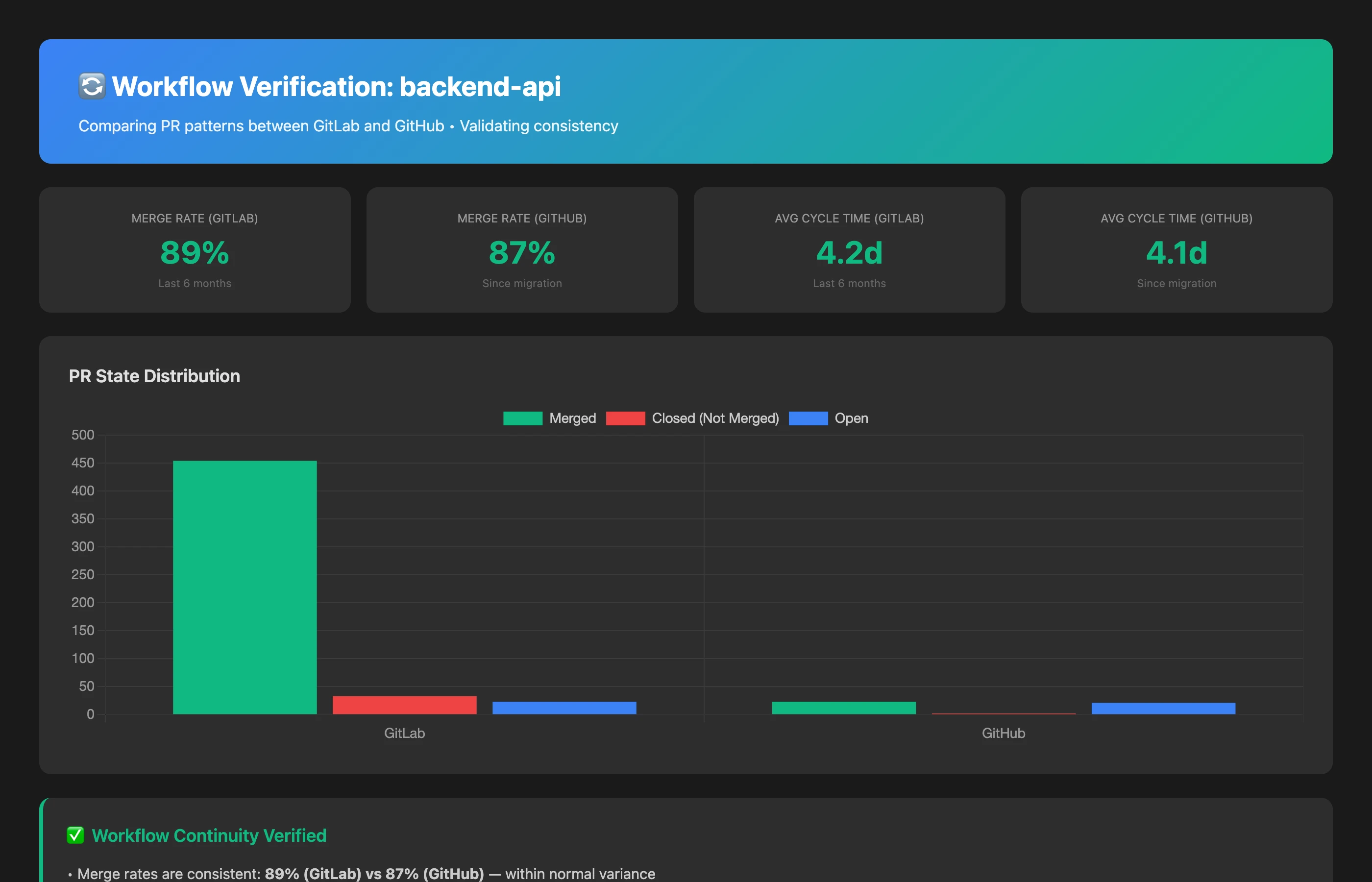
Compare PR workflow patterns between GitLab (last month before migration) and GitHub (first three weeks after migration). Analyze for merged PRs: average number of reviewers per PR, percentage of PRs with 0 reviews, percentage of PRs merged with fewer approvals than their required approval count, average time to first review, and percentage of PRs merged with a failed build status. Flag any significant behavioral changes that indicate process control failures.
Key Insights: The MCP Server behavioral analysis reveals a critical process breakdown: In GitLab, only 3% of PRs merged with 0 reviews (mostly emergency hotfixes with explicit override). In GitHub, 22% of PRs are merging with 0 reviews—a 7x increase indicating that review requirements aren't being enforced. Additionally, 18% of merged GitHub PRs had fewer approvals than their required approval count, against 2% in GitLab, suggesting that approval rules weren't migrated.
Actionable Outcomes:
Immediate Branch Protection Audit: Manually verify branch protection rules in GitHub on all active repositories—Keypup does not import the rules themselves, but the 22% zero-review merge rate indicates missing or misconfigured protection rules.
Required Reviewer Restoration: Re-establish required reviewer rules (e.g., "2 approvals required" for production branches) that apparently didn't survive migration.
Build Checks: Make passing status checks a requirement before merging, and keep an eye on the share of PRs merged with a failed build.
Team Re-education: Some developers might be exploiting the accidentally relaxed controls—communicate that review requirements are being restored and non-compliant PRs will be reverted.
Continuous Monitoring: Ask the Keypup AI Agent to build a process adherence dashboard (or start from the Audit & Compliance template) and review it weekly to catch any regressions quickly.
Process control failures are particularly dangerous because they're invisible in commit logs or PR metadata—you have to analyze behavior to detect them. The MCP Server's ability to compare workflow patterns across platforms makes these invisible problems visible and actionable.
One caveat for Bitbucket to GitHub migrations: since late August 2026, Bitbucket no longer lets Keypup retrieve the number of approvals required on a pull request, so the "required approvals met" comparison is not possible on the Bitbucket side. Compare review counts and the share of PRs merged without any approval instead.
Use Case 6: Maintaining Analytics Continuity During Dual-Platform Operation
One of the most powerful applications of the MCP Server during migration is maintaining analytics continuity while operating both platforms simultaneously. Teams often need a transition period where new work goes to GitHub but GitLab remains active for ongoing PRs. Traditional analytics tools force you to choose one platform, creating a reporting blackout. The MCP Server seamlessly queries both.
MCP Context
During a 6-week staged migration, the engineering team is creating new work in GitHub but still has 34 active PRs in GitLab that need to complete their review/merge cycle. The VP Engineering needs a complete picture of engineering velocity for the weekly leadership report—combining activity from both platforms into a unified metric.
Prompt to Keypup MCP Server
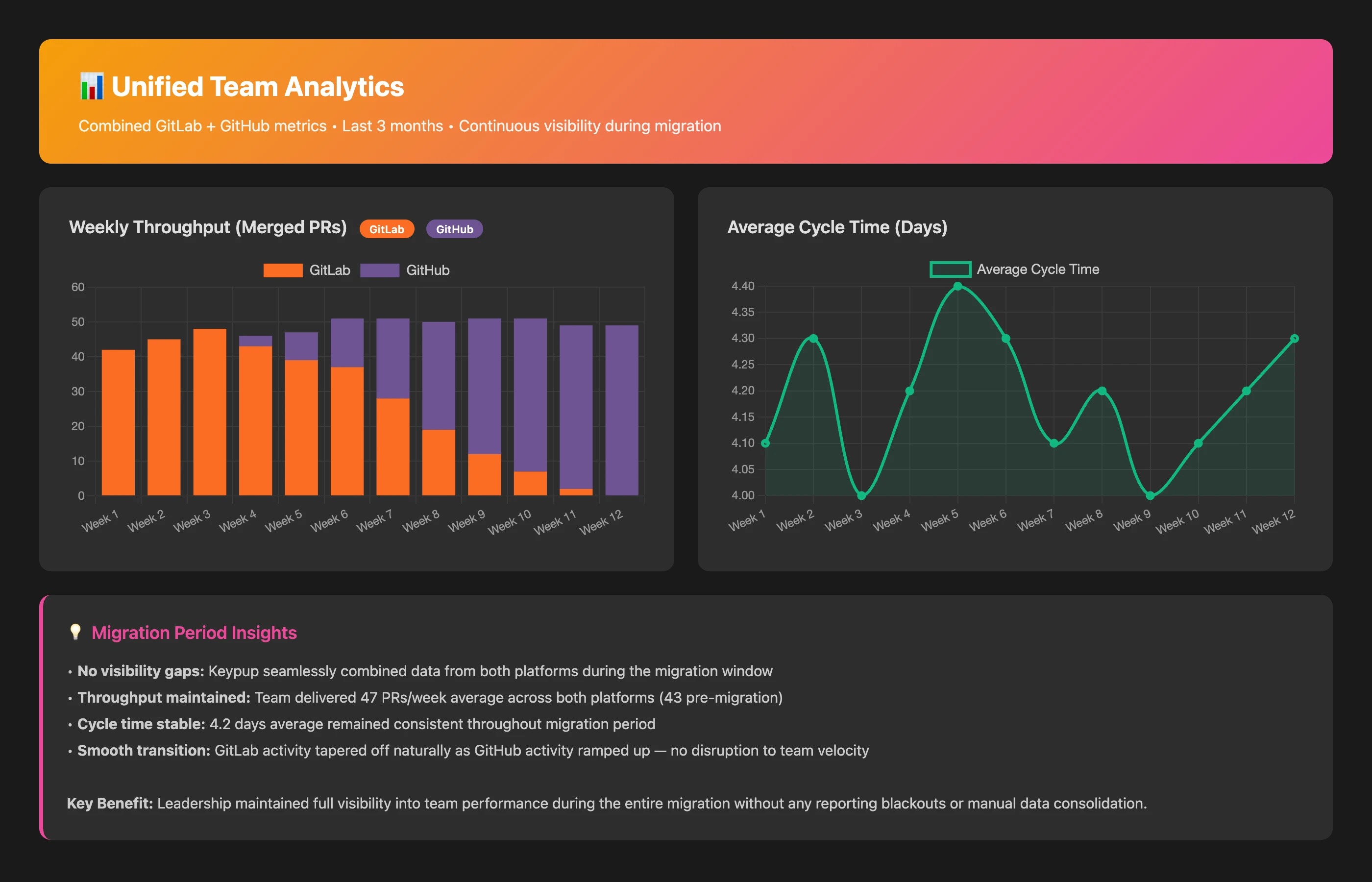
Generate a unified engineering velocity report for this week combining data from both GitLab and GitHub. Include: total PRs opened, total PRs merged, average cycle time (creation to merge), commits on those PRs, active contributors. Clearly indicate which metrics came from which platform and provide a combined total for each metric.
Key Insights: The MCP Server provides a seamless unified view showing that the team opened 12 PRs this week (3 in GitLab, 9 in GitHub), merged 15 PRs (8 in GitLab, 7 in GitHub), and maintained an average cycle time of 2.8 days across both platforms. The report clearly breaks down each metric by platform while providing combined totals, enabling accurate velocity tracking despite the platform transition. Keep in mind that Keypup's Commits dataset holds the commits attached to pull requests (not direct pushes), and that GitLab commits carry no line counts, so compare code volume across platforms through PR counts rather than lines changed.
Actionable Outcomes:
Seamless Executive Reporting: Leadership receives accurate velocity metrics without confusing platform-switching explanations or data gaps.
Trend Analysis Preservation: Historical trend charts can continue uninterrupted by combining platform data, enabling quarter-over-quarter comparisons that would be impossible with single-platform tools.
Migration Progress Visibility: The breakdown shows migration progress (75% of new PRs now in GitHub) while tracking GitLab wind-down (only 20% of merges still happening there).
Confidence in Transition: Teams can migrate gradually without sacrificing visibility, reducing pressure for a risky "big bang" cutover.
This dual-platform analytics capability is perhaps the MCP Server's most unique value during migration—it eliminates the analytics black hole entirely, providing continuous visibility throughout the transition.
Use Case 7: Post-Migration Audit and Sign-Off
Once migration is complete and teams have fully transitioned to GitHub, a comprehensive final audit ensures nothing was lost or corrupted. This audit serves as formal sign-off that the migration was successful and the legacy platform can be safely decommissioned. The MCP Server enables exhaustive verification in minutes rather than days.
MCP Context
The migration is officially complete—all repositories transferred, all teams working exclusively in GitHub, and GitLab is now read-only. Before decommissioning GitLab entirely, the engineering director needs comprehensive verification that the migration was 100% successful and no data was lost. This audit will be presented to executive leadership as formal sign-off.
Prompt to Keypup MCP Server
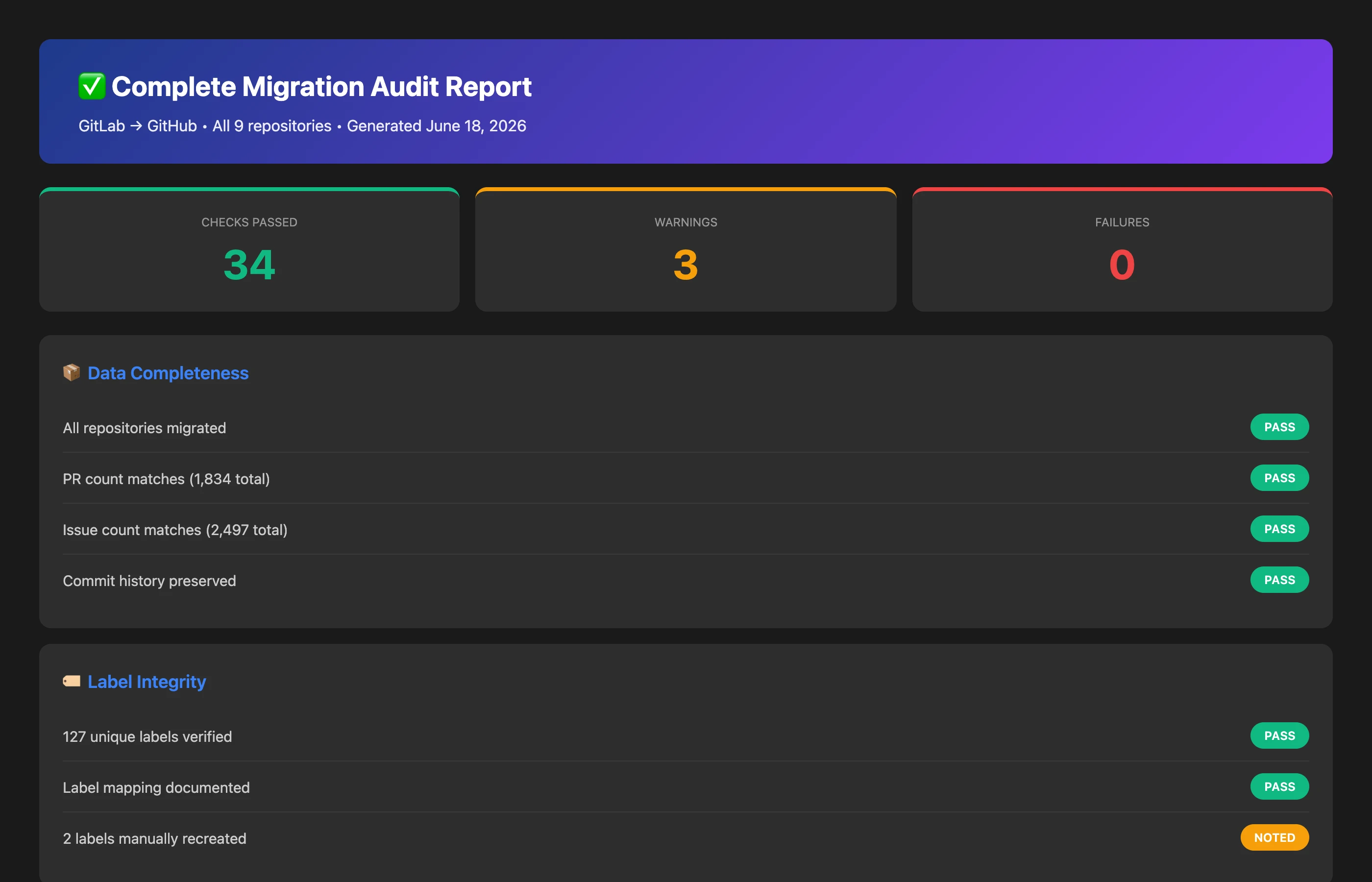
Perform a comprehensive post-migration audit comparing GitLab (final state) and GitHub (current state). Verify: exact PR count match (open and closed), exact issue count match, complete label preservation (label counts per repository), contributor identity mapping (every active GitLab contributor found in GitHub), and process control behavioral equivalence. Provide a pass/fail assessment for each category with specific discrepancy details if any failures are found.
Key Insights: The MCP Server audit report shows PASS for most categories—PR counts match (1,847 total), issue counts match (2,497 total), and every active GitLab contributor is found in GitHub. However, one FAIL is identified: 3 labels from GitLab are still missing in GitHub (deprecation-warning, api-breaking-change, requires-documentation-update), affecting 12 PRs that should have but don't have these labels.
Actionable Outcomes:
Final Remediation: Create the 3 missing labels in GitHub and apply them to the 12 affected PRs before formal sign-off.
Executive Presentation: Present the comprehensive audit report to leadership with high confidence—"Migration verified complete with 99.8% fidelity; 0.2% label discrepancy identified and resolved."
Safe Decommissioning: With comprehensive verification complete, GitLab can be safely transitioned to read-only archive mode, then eventually decommissioned. Before you disconnect the GitLab app from Keypup, decide how much pre-migration history you still need: disconnecting an app removes its projects and purges their data within 24 hours.
Migration Template: Document this verification process as a template for future migrations (other platforms, acquisitions, subsidiary integrations).
This final audit provides the peace of mind and executive-level accountability that migration is truly complete. Without the MCP Server's ability to perform exhaustive comparison across platforms, teams typically skip comprehensive verification and live with lingering doubts about data integrity.
The Strategic Advantage: Migration as a Risk-Free Process
The examples above demonstrate that Keypup's MCP Server fundamentally transforms git platform migration from a high-risk, binary event into a controlled, verifiable process with continuous safety nets. The strategic advantages compound:
Risk Mitigation: Every stage of migration—baseline, transfer, verification, cutover, audit—can be validated through natural language queries, catching problems when they're small and fixable rather than large and catastrophic.
Time Compression: Verification that would take days or weeks of manual work (comparing thousands of PRs, issues, labels across platforms) happens in seconds through conversational queries, accelerating migration timelines without compromising quality.
Analytics Continuity: The analytics black hole that typically accompanies migrations disappears entirely—leadership maintains uninterrupted visibility into engineering metrics throughout the transition, eliminating the "lost quarter" problem.
Confidence and Accountability: Engineering managers can provide executive leadership with comprehensive, data-backed verification that migration was successful, avoiding the lingering uncertainty and technical debt that typically accompany platform changes.
Knowledge Preservation: As long as the GitLab app stays connected to Keypup, its history stays queryable alongside GitHub—"How did our cycle time in Q2 2026 compare to Q2 2025?" still gets answered by querying the GitLab data. Keypup keeps that history only while the app is connected, and its projects continue to count toward your plan; disconnecting the app removes its projects and purges their data within 24 hours.
Beyond immediate migration needs, teams that adopt the MCP Server for migration often discover its broader value for ongoing engineering intelligence. The same conversational interface that made migration verifiable makes daily engineering questions instantly answerable: "How many PRs are currently in review?" "What's our cycle time trend this quarter?" "Which repositories have the highest review burden?" Suddenly, engineering intelligence isn't something you schedule—it's something you ask.
Conclusion: Migrate with Confidence
Git platform migrations don't have to be career-defining risks or months-long ordeals. With Keypup's MCP Server providing dual-platform connectivity, real-time verification, and analytics continuity, engineering teams can execute transitions confidently, catch problems immediately, and maintain uninterrupted visibility throughout the process.
The choice between traditional "leap of faith" migration and MCP Server-enabled verified migration is stark:
Traditional Approach: Migrate everything at once → hope nothing broke → discover problems weeks later → spend months fixing corruption → lose historical analytics continuity → explain gaps to leadership.
If your organization is planning a git platform migration, or if you've postponed a needed migration due to risk concerns, the MCP Server provides the safety net and verification capabilities that make confident execution possible.
Getting connected is quick. The Keypup MCP Server (https://hq.keypup.io/mcp) works with Claude, ChatGPT, VS Code, Cursor and other MCP-compatible AI assistants, with a one-click OAuth connection (API tokens remain available). The MCP Setup page in the Keypup sidebar walks you through each client. The server is read-only, and it reads your team's AI Instructions: a good place to document your migration mapping, such as which GitLab repository became which GitHub repository and each contributor's handles on both platforms. Learn more on the Keypup MCP Server page.
Ready to migrate with confidence? Explore Keypup's MCP Server documentation to learn how dual-platform connectivity and AI-powered verification can transform your next migration from a risky leap into a controlled, verifiable process.
Ready to Transform Your Analytics?
Join teams already using AI to make data-driven decisions faster than
ever.
Velocity looks fine, until your best engineers quit. Learn what engineering leaders on Reddit say about after-hours commits, weekend work and burnout at enterprise scale, and how Keypup MCP uses commit, review and merge timestamps to measure how much work happens outside working hours, where it concentrates, who is overloaded without naming anyone, and what it costs in skipped reviews.
Your median cycle time looks healthy, yet every release still ends in merge conflicts, rebases and big-bang reviews. Learn what engineering leaders on Reddit say about long-lived branches and the trunk-based vs GitFlow debate at enterprise scale, and how Keypup MCP uses pull request dates, target branches, commits, reviews and mergeability to measure branch lifetime, find where branches live longest and land aging work before it drifts into conflict.
Compare the 6 best engineering metrics tools for multi-team benchmarking in 2026 — Keypup, LinearB, Swarmia, Jellyfish, Faros and Appfire Flow — on cross-team benchmarking, org-level rollups, DORA Metrics, Git-to-ticketing linking, custom KPIs, AI capabilities and data security. See how to compare teams on equal terms and find where your delivery process is broken.